Viewing a Purging Rule’s History and Audit Files

You can view detailed information about the actions performed on a purging rule, for example, when its activation status was changed or it was executed. If your data purging settings are set up to do so, you can also view audit files listing the items that were purged or that failed to be purged.
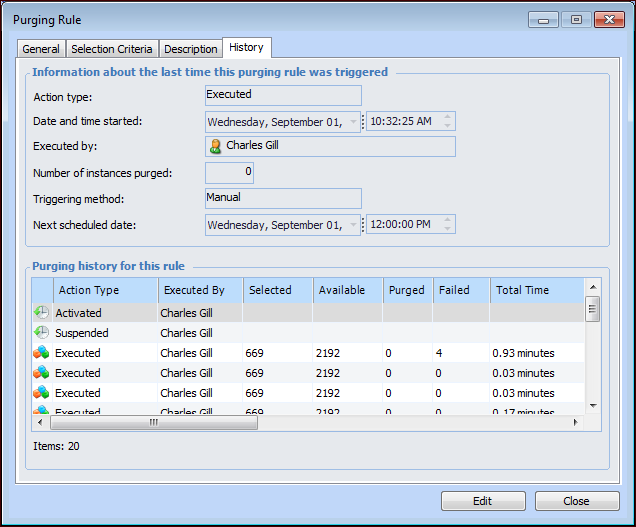
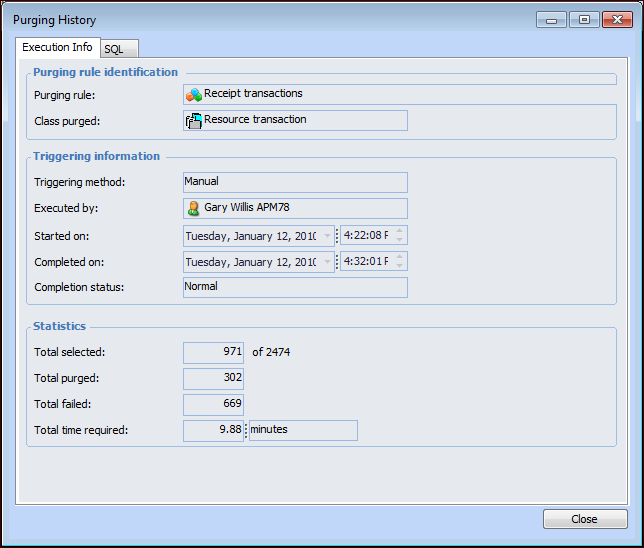
Whenever a purging rule is activated, suspended, or executed, the event is recorded. When a rule’s activation status changes, the date and time when the event took place is recorded, as well as the employee who performed the action. When a rule is executed, the following information is recorded:
As long as your data purging settings specify that one or both of the following are recorded, you can also view them online and in separate files:
For more information about data purging settings, see Specifying Data Purging Settings.
This topic explains how to view a list of a purging rule’s events, how to view detailed information about individual events, and how to access audit files online.

To View a Purging Rule’s History

1.
Information about the most recent action is displayed at the top of the tab.
Tip: You can also view purging history for all purging rules. From the Data Management view, select the Data Purging tab, and then the Purging History tab.
2.
The SQL tab displays the SQL select statement that was generated to perform the purge. If your data purging settings specify that audit reports of purged data, audit reports of data that failed to be purged, or both are to be saved, the Purged Data and Purge Failures tabs are available.
You can also view these HTML files in the directory specified in the data purging settings.
3.

To View Audit Files

1.
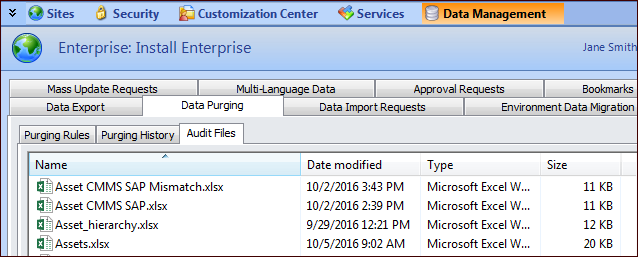
From the Data Management view, Data Purging tab, select the Audit Files tab. For example:
Audit reports are stored as HTML files in sub-folders that are created on an as-needed basis below the folder specified in the data purging settings. A separate folder is created for each class of object that is purged. For example, there could be a sub-folder for purged work requests and another for purged resource transactions.
The HTML files in each folder are named by concatenating the purging rule name, the report type (that is, Purged objects or Failed deletions), and the date and time on which the purge was completed. For example, a report might be named “Labor transactions more than 7 years old - Purged objects (September 1, 2005 05:00).html”.
2.