Customization FAQ

Why did I get this message after starting APM? “The Customer cache files are out of sync with the database, indicating that customizations have been made but the cache files have not been regenerated. Generate custom cache files now?”
Customizations were made but the customer cache files were not updated. Click Yes to generate correct cache files.
Why did I get this message after performing customizations? “An error occurred while deploying customizations to the network server. This may indicate an incorrect server path, a problem with the network or the server, or that you do not have permissions to write the files on the server.”
When you unlock the system after performing customizations, APM re-generates the cache and schema, and attempts to deploy your customizations to your master APM installation. You will get this message if you do not have Create and Write permissions for the shared APM directory on the master APM installation. You must be able to create files and folders and write to this directory. If this is the case, obtain the correct permissions and then try the deployment process again.
I have customized a view, but when I view it in the system, some of the controls (fields and buttons) are missing.
This can be caused by overlapping controls. To fix this problem, you need to customize the view again and re-set the tabbing order of the controls. The control that becomes invisible must have a lower tab number than the overlapping control that hides it.
I have customized a view and now my button doesn’t work or I can’t enter text into a control.
This can be caused by overlapping controls. To fix this problem you need to customize the view again and reset the tabbing order of the controls. The control that no longer works must have a lower tab number than the overlapping control that hides it.
How do I regenerate the custom schema?
On the Customization Center view, click Generate and then Schema.
When adding a custom relationship to the UI, all I get is a big Browse button.
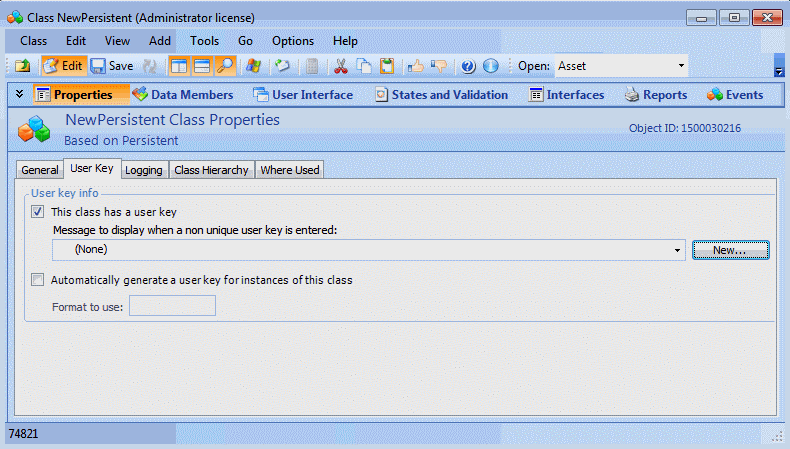
When you create a new custom Persistent class, the class should have at least one attribute that is a user key member. If there are no user key members, any controls for a References One relationship to that class will not have a default field to display.
To add a user key to a custom class:
1.
Open the custom class and select the Properties view, User Key tab.
2.
Select This class has a user key.
3.
Select the Data Members view, and then add or select an attribute to be the user key for the class.
I get schema errors! What do I do? OR
When I run APM (with customizations) I get the message “CAX with a certain ID is not found”. What do I do?
Delete your customer cache files (Bentley\AssetWise Performance Management\cache\CustomerData) folder. Open the Customization Center and regenerate both custom cache and schema.
If that doesn’t work, try forcing the system to regenerate the custom schema: lock the system, add a “dummy” attribute to a custom class, and then unlock this system. The system should automatically regenerate both schema and cache. Afterwards, delete the “dummy” attribute.
I get “Invalid column name” messages. What do I do?
Delete your customer cache files (Bentley\AssetWise Performance Management\cache\CustomerData folder). Open the Customization Center and regenerate both custom cache and schema.
I cannot see my new customizations. What do I do?
Delete your customer cache files (Bentley\AssetWise Performance Management\cache\CustomerData folder). Open the Customization Center and regenerate both custom cache and schema.
Why can’t I save instances of my custom class?
When you get this message it’s because your User Key is not unique. The User Key for a class consists of the combination of its owning and/or scoping parent reference(s) and whatever field you’ve specified as the “User Key field”.
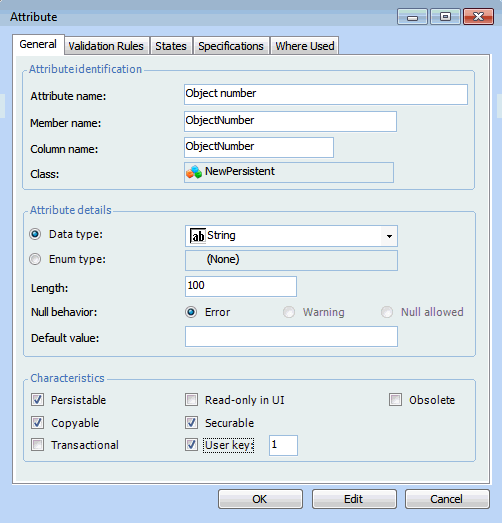
There is a check box on the Attribute dialog that you select to specify that the field is the User Key. This combination establishes a unique index combining the reference(s) and the UKey field on the table. If you have not specified a UKey field, then just the parent reference composes the unique index. As soon as one record has been saved, the system will detect subsequent ones as already having that “name”.
You need to make sure that you have flagged a field on each of your custom classes as being the User Key field. Typically it is a short string field that people would expect to be unique (for example, work request number). You can have more than one user key per class; they are combined as a composite key that has a unique value. For example, you could have an analysis number and analysis name combined into a unique key.