Defining Map Layers

Administrators can define external web services to be used as map layers in APM configurations.Note that to define a map layer you should already have an understanding of the different types of web services and their components.
Note: In order to include additional external map layers, Microsoft Internet Explorer version 11 or greater must be installed.
This topic explains how to define a web service for a map layer so that it can be used as a base map or additional map layer for configurations.

To Define a Map Layer

1.
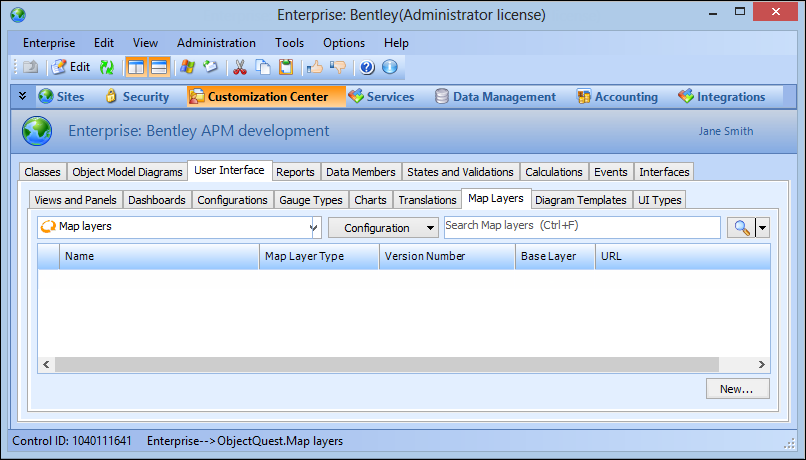
On the Enterprise window, select the Customization Center view.
2.
Select the User Interface tab, and then the Map Layers tab. For example:
3.
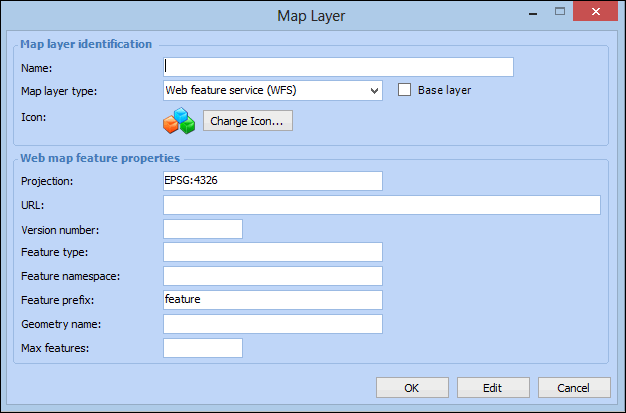
Click New. The Map Layer dialog appears.
4.
The type of map layer. Options are Web feature service (WFS), Web map service (WMS), Web map tile service (WMTS).
If selected, this map layer can be a base map layer and will appear in the list of Other Web Maps on the configuration dialog’s Appearance tab, Map tab, Base Map tab.
5.
If you selected Web feature service (WFS), complete the following information:
The feature namespace alias and is only used if Feature Namespace is provided. The default is “feature”.
6.
If you selected Web map service (WMS), complete the following information:
7.
If you selected Web map tile service (WMTS) service, complete the following information:
8.
Click OK to close the dialog and save the map layer.
9.
Repeat steps 3 to 8 for each map layer you want to create.