Overview of Asset Prioritization Analysis

Asset prioritization analysis (also known as equipment risk prioritization) is an organized and methodical procedure for assessing the importance of assets within your organization. A prioritization analysis identifies the business risks posed by an asset’s failure in terms of safety, environmental impact, and operational and non-operational consequences. It takes into account the asset’s probability or rate of failure.
The outcome of an analysis is two numbers: the asset’s consequence priority number and relative risk. Relative risk takes into account both the consequence scores and the probability (or rate) of asset failure. These two numbers help you to determine the need for reliability improvement projects, further strategy development analysis, work planning, and asset reliability programs. In general, asset prioritization analysis is a tool to further refine your reliability program and ensure that you are doing the right work at the right time.
In APM, you can define the analysis criteria to analyze your assets, along with the failure probabilities and consequence priorities. These values and rules are defined in the site’s Prioritization settings. APM provides standard criteria, probabilities, and consequences. You can choose to keep the supplied lists or modify, add to, or delete them.
You can also define analysis types that, when applied to a prioritization analysis, supply default selections and preferences.

Asset Hierarchy Development and Prioritization

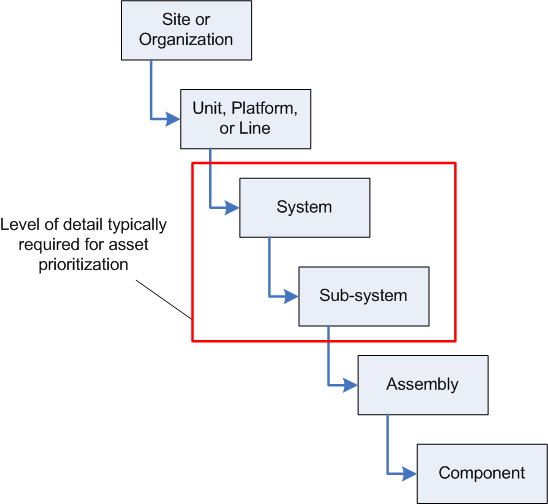
Before you carry out a prioritization analysis, you should have a considered and well-constructed asset hierarchy. It is important to ensure that the hierarchy is defined to the right level. Ideally, the hierarchy is defined to the level in which maintenance work is performed and/or information is tracked. For the purposes of asset prioritization, this level of detail is not mandatory. However, as a minimum, all systems should be defined, as well as all sub-systems or child assets with separate functions.
A good hierarchy helps to determine which assets should be analyzed. Prioritization analyses are generally carried out at the system or sub-system level. For example:
If you choose a place too high in the hierarchy, you can miss important information and overlook failure modes. If you complete the analysis too deep in the hierarchy, you might do needless work and waste valuable resources.
TOP

Analysis Criteria

Once the asset hierarchy is defined, you must identify business goals to evaluate the assets against. These business goals become the analysis criteria and are used for all analyses carried out in APM; therefore, you should be certain that they are applicable to all assets you will be analyzing now and in the future. Usually there are six or seven criteria, which can include safety, environment, operating cost, and so on.
After your business goals have been identified and analysis criteria have been determined, decide if any of the criteria should be given more importance during the analysis. You must decide what the maximum score attainable will be for each criterion. The maximum score is the highest score a criterion can attain during an analysis. The higher the score, the more critical the result of failure. For example, the criterion safety might be given a maximum score of 40 points and operating cost only 10 points. Safety then contributes more points to the overall priority score and thus is a more important criterion.
As a general rule, safety and environment are given equal maximum scores, while the sum of all operating consequences is equal to the maximums for safety and environment.
The system comes with six criteria already defined. These are the most commonly used criteria for analyses. You can use all, some, or none of these criteria.
Notice that the maximums for operating consequences (quality, throughput, customer service, and operating cost) total 40 points.
TOP

Failure Consequences

You must define a set of failure consequences for each criterion and assign a score to each consequence. The more severe the consequence, the higher the score. When an asset is analyzed, the appropriate consequence is selected. This determines the asset’s score for that criterion.
The scores for each consequence must be less than or equal to the maximum score for that criterion, and each score must be unique. For example, for safety, one consequence of failure might be multiple fatalities. The consequence would be given the maximum score of 40 points. Another consequence might be minor injury. This could be given a score of 15 points. Each consequence can also have additional explanations or examples to further assist in the analysis.
The table below outlines the suggested criteria, consequences, and associated scores. These settings are delivered with the product but can be modified to suit your organization.
TOP

Failure Consequence Explanations

TOP

Weighting Factors

You can assign weighting factors (whole numbers greater than 0) to analysis criteria to raise or lower the significance of individual criteria. The consequence score is multiplied by the weighting factor. For example:

Failure Probability

Failure probabilities (or failure rates) must also be defined and assigned scores so that analyses can arrive at the asset’s relative risk. For example, an asset that fails daily might be given a score of 10. An asset that fails less than once in 10 years might be given a score of 1. The table below outlines the suggested scores and frequencies.

Probability of Failure Evaluation

For assets that require detailed or formal probability assessments, you can set up a criteria-based probability evaluation to be performed in the context of the asset prioritization analysis.
Note: To use this functionality in APM, you must first enable feature 39. In the Enterprise window, select the Customization Center view and the Enabled Features tab. Click Browse, select “Criteria based probability evaluation on an asset prioritization analysis”, and click OK. If APM is running as a smart client, click Refresh Enabled Features on the server. Then restart the client to use the functionality.
You can enable the probability analysis feature to provide options for more detailed assessments of probability of failure. Once the probability evaluation is set up, analysts can select appropriate examples of criteria such as operating environment and age. APM uses the scores assigned to the examples to calculate the probability of failure.
For more information, see Setting up Probability of Failure Criteria and Setting up a Probability of Failure Criteria Matrix.
TOP

Asset Consequence Priority

One of the outputs of a prioritization analysis is the asset’s consequence priority number. The priority number is determined by comparing an asset’s failure consequence scores to a set of rules. These rules are defined at the same time as the analysis criteria.
The priority ranking is used as a multiplier with the alarm severity to determine if an indicator alarm is pushed up the hierarchy to the parent assets. In the Indicator Settings, you must enter the minimum alarm notification ranking that is needed to alert parent assets. The alarm notification is calculated by multiplying the alarm severity ranking with the consequence priority number. For example, with critical alarm (alarm severity 10) and priority ranking of 5, the alarm notification ranking would be 50 (10 x 5 = 50). If your site minimum alarm notification for pushing up the hierarchy is set for 60, this alarm would not be visible higher up the hierarchy.
The priority ranking is also used to prioritize work activities. In many maintenance systems, this is also called the “criticality” of the asset. For example, you would usually perform maintenance on an asset with priority 9 before one with priority 2.
However, when the priority numbers are close together (for example, 4 and 5) it can become difficult to distinguish any difference. Therefore, it is important to review the nature of the failure mode and consequences. For example, you might have two requests: one to paint the exterior of a chemical tank with priority 9, and one to calibrate a measurement system with priority 6. In this case, the calibration might have a higher urgency than the chemical tank painting.
Note: Good practice limits the number of priority numbers to no more than nine and typically no fewer than five. With too many numbers, the meaning becomes ambiguous. With too few, it is difficult to make decisions based on that number alone.
An asset’s priority number is determined by comparing the asset’s scores for each criterion to rule clauses. For example, the highest priority rating of 9 has the analysis rule “If safety or environment >/= 38, then priority equals 9.” You can also use rule statements that sum several criterion scores or just compare to the maximum criterion score an asset attains.
To illustrate how consequence priority numbers are determined, consider the following priority number rules.
The following assets have been analyzed and given the scores shown:
The priority numbers assigned to these assets are:

Explanation

Asset A1 is assigned a priority number of 9 due to its safety consequence score of 40. This meets the equal to or greater than 38 rule for this priority.
Asset A2 is also assigned a priority number of 9, in this case due to its environmental score of 38.
Asset A3 would also be assigned a priority of 9. While its safety and environmental consequences are low (relatively speaking), the sum of its remaining consequences total 38. This meets the second rule for assigning an asset a priority of 9.
Asset A4 would be assigned a priority of 8 due to its high score for quality.
TOP

Priority Number Suggested Rules Settings

Rule Sets

If you wish to tailor analyses for different sites or asset families, you can define a rule set with a descriptive name, for example, Site A. Select the rule set when creating analysis criteria. Then, when you are setting up consequence priorities, select the rule set on rule clauses to filter the list of criteria available.
Tip: Create rule sets that apply to multiple sites on the top site. Create rule sets that apply to a specific site on that site.
In the prioritization analysis, select the appropriate rule set. When APM calculates the scores on the analysis, it uses only the criteria and rules that reference that rule set. If the analysis does not have a rule set, only rules that do not have rule sets are used.
You can also assign a rule set to an analysis type. When the type is applied to an individual analysis, the rule set is selected by default.
TOP

Relative Risk

Relative risk is one of the outputs from an asset prioritization analysis. It is the product of the probability of failure of an asset and the consequences of failure.
Relative Risk = (Probability of Failure) x Sum (Consequence of Failure Scores)
Relative risk is used to direct the development of asset reliability programs. You would focus the development of your asset reliability program first on those assets with higher relative risk.
TOP

Which Assets Should be Included in an Analysis?

The results of an asset’s prioritization analysis can be applied to its descendant assets. This approach is based on the premise that the equipment and components contained in a system are for the most part of the same priority as the system. Therefore, the analysis is performed at the system level. This reduces the effort required to perform the analysis by analyzing a smaller number of assets.
This approach does not work when an individual piece of equipment’s or component’s priority is different from that of the system. For example, if there is a built-in backup for a particular component, the back-up component’s priority might be less than that of the system. In this case, the asset can be added to the analysis and analyzed separately.
Alternatively, the results of an asset’s prioritization analysis can be applied to assets above it in the hierarchy (its ancestors) or assets on the same branch of the hierarchy (its peers).
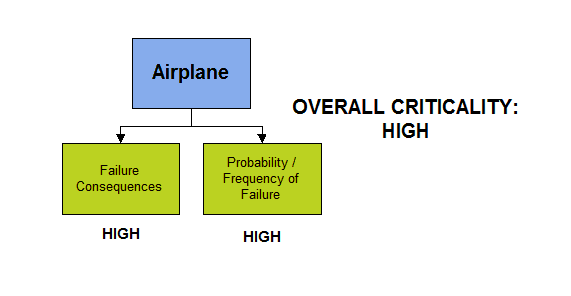
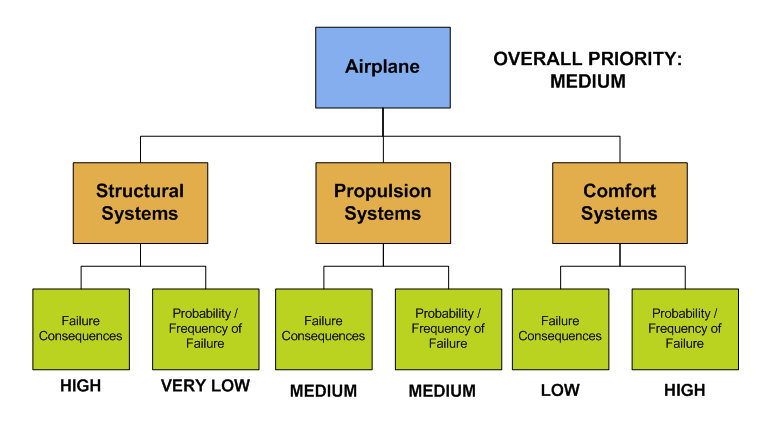
The two factors used in a prioritization analysis are the potential consequence of the failure when it occurs and the probability that the failure will occur. If the level of the analysis is too high, the resulting estimate of risk associated with the equipment can be misleading. This is illustrated in the following airplane example. If a risk assessment is done at the airplane level, the result is that the entire airplane is considered high risk.
However, simply moving the analysis down to the system level achieves a much different perspective. The structural systems of the airplane have a high consequence if they fail, but they are extremely reliable, having a low failure rate. The airplane propulsion systems have only a medium consequence when they fail because of built-in redundancy. The failure rate is probably higher than the failure rate for structural systems. The relative risk is therefore greater. The comfort systems of the aircraft (such as seats, lights, and entertainment features) have minimal failure consequences; however, failure is much more likely. Again overall risk is low. This result seems more reasonable.

Applying Analysis Results to SAP Equipment and Functional Locations

If APM has been configured to access SAP Plant Maintenance using an external data provider plug-in, you can have ABC indicators updated when the analysis results are applied to assets. Each asset’s referenced equipment or functional location in SAP has its ABC indicator updated using data loading.
For more information about setting this up, see APM Interoperability Guide for SAP Plant Maintenance.