Creating a Supplier Resource for an On-site Contractor

Supplier resource prices are used to identify the supplier’s price for each supplied trade. This is the price at which the on-site contractor’s work is charged; it is used as the rate on the timecards created to record the contractor’s work.
The on-site contractors (employees) who are eligible to use the price must be identified on the supplier resource price. Only on-site contractor employees who are employed by the supplier are available for selection.
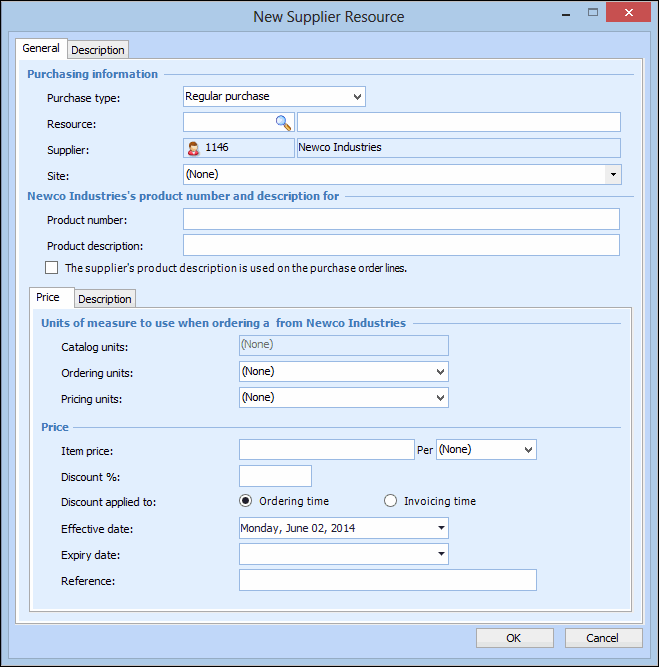
Use the new supplier resource dialog to define both the supplier resource and the supplier’s current price. After the supplier resource has been created you can add more prices. See Adding Prices to a Supplier Resource.
Note: If you are using a request for quotation (RFQ) process, supplier resource prices will be created at the time the RFQ is awarded. See Awarding RFQs.

To Create a Supplier Resource

1.
2.
Select the Resources view.
3.
Click New. The New Supplier Resource dialog appears.
4.
Set the Purchase type to On site contractor.
5.
6.
7.
On the Price tab, in the Units of measure section, select the ordering and pricing units of measure:
8.
In the Price section, enter:
9.
Select the Details tab. Enter the following, as appropriate:
Replenishment review is required: The replenishment requisition must be reviewed before a purchase order is created.
Replenishment review is not required: The purchase order will be automatically generated as soon as the replenishment requisition is created.
10.
If the ordering units of measure are different than the pricing or catalog units of measure, you can set a conversion factor. Select the Conversions tab and click Conversion Calculator. Enter the conversion factors, and click OK.
11.
Select the Charges tab.
12.
13.
Select the Description tab. On this tab you can enter a longer description of the resource.
14.
When you are finished entering information about the resource, click OK. The new supplier resource appears in the list.
15.
When you are finished, Save and Close the Supplier window.