Adding Extra Charges to a Supplier Resource

The cost of some supplier resources can include extra charges. You can record these extra charges so they will automatically be added to the price on purchase orders. When you add an extra charge to a supplier resource, it applies to all of the prices entered for the resource.
You can also add extra charges when you are entering a price. If you enter an extra charge on a price, it applies to the resource only during the effective period of the price. To add extra charges to a prices, see Adding Extra Charges to a Supplier Resource Price.

To Add Extra Charges to a Supplier Resource

1.
2.
3.
Select the Charges tab. The table at the bottom of the tab lists the existing extra charges that apply to this supplier resource.
4.
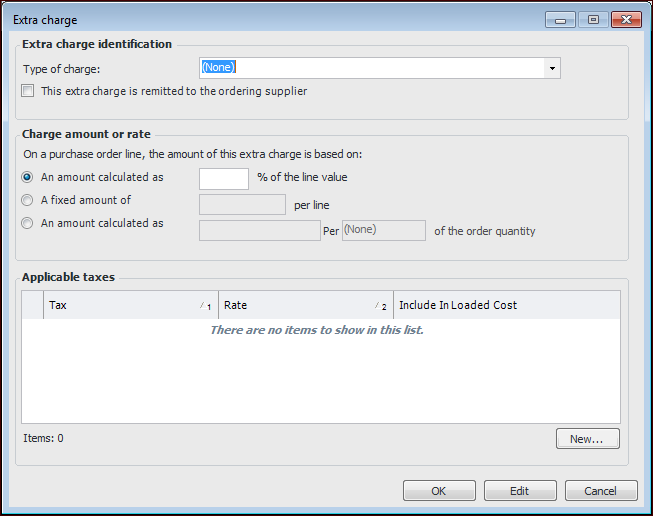
To add an extra charge, click New. The Extra Charge dialog appears.
5.
6.
Indicate whether or not the This extra charge must be remitted to the supplier. If the charge is remitted to the supplier, it is included in the amount you pay the supplier for the item.
7.
Percent of Value: The extra charge is a percentage of the value of the purchase order line. For example, if the value of the order is $20 and the extra charge is 5% of the value, the system applies an extra charge of $1 to the purchase order line.
Fixed Amount: The extra charge is a fixed amount per purchase order line. For example if the fixed amount is $5, the system adds an extra charge of $5 to each purchase order line for this supplier resource and price. (Not available for consignment purchases.)
Per-Unit Amount: The extra charge is a fixed amount per unit of the order quantity in the purchase order line. For example, if the fixed amount is $1 per unit and 20 units are ordered, the system adds an extra charge of $20 to the purchase order line.
8.
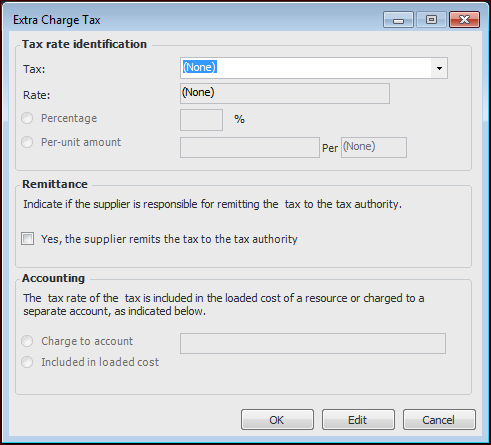
Click New to select the applicable taxes payable on this extra charge. The Extra Charge Tax dialog appears.
9.
10.
Repeat steps 8 and 9 for each tax payable on the extra charge.
11.
To save the extra charge, click OK. The extra charge appears in the list.
12.