
Creating an Indicator-based Rule Clause

Triggering rules are made up of rule clauses. When you create a triggering rule for a standard job or a preventive maintenance (PM) route, you can use both time-based and indicator-based triggers.
This topic explains how to create an indicator-based rule clause. To create a rule clause that uses time-based triggers, see Creating a Time-based Rule Clause.

To Create an Indicator-based Rule Clause
1.
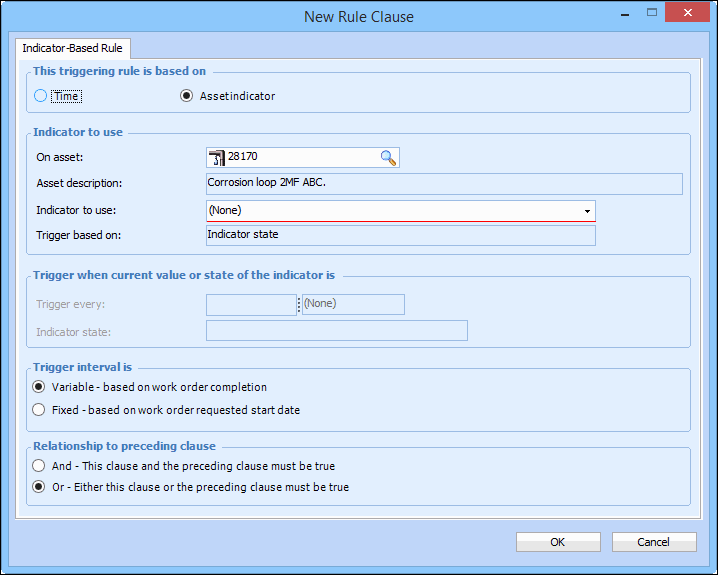
In the New Rule Clause dialog, select Asset indicator.
2.
By default, you can select indicators from the asset that controls the triggering of the standard job. You can pick an indicator from a different asset by changing the asset in the On asset box. To change the asset that owns the indicator, click Browse. In the selector dialog select an asset and click OK.
Note: If the selected asset is an installed component, the Location and Component options appear. You can switch from an installed component to its location or from a location to a component using these options.
3.
Select the indicator from the Indicator to use list. The options on the dialog change based on the type of indicator that you select.
4.
Numeric indicator with states: If the indicator has states, you can select to trigger based on the current state of the indicator. In the Trigger based on list, select Indicator state. Select an Operator and an Indicator state for the rule clause. For example, if your indicator states are “Normal,” “Warning,” and “Alarm,” you could select an operator that triggers the rule when the stat is “Greater than or equal to” “Warning.”
Numeric indicator with values: You can select to trigger based on the value of the indicator. APM evaluates the rule clause based on the value of the latest indicator reading. In the Trigger based on list, select Indicator value. Select an Operator and enter a Trigger value for the rule clause. For example, for a temperature indicator, you could enter “Greater than or equal to” 50 degrees.
Cumulative indicator: In the Trigger every box, enter how often the job should be triggered (for example, every 5000 miles). If you need a warning before the job is triggered, in the Early warning box enter when the early warning should occur (for example, 500 miles in advance).
Descriptive indicator: Select an Operator and an Indicator state for the rule clause. For example, if the indicator states are “Normal,” “Warning,” and “Alarm,” you could select to trigger the rule when the state is “Greater than or equal to” “Warning.”
Rule-based indicator: Select the Indicator state that will trigger the rule clause. Rule-based indicators have only two states: normal and the alarm state.
5.
6.
Click OK to save the rule clause and close the dialog.