Creating an Asset Activity Report

After the asset activity report components such as the report sections, types, statuses, and so on have been set up, you can create an asset activity report.
To simplify the report creation process, the report type chosen for the report predefines the report’s group, classification, as well as report dates, printing and publishing options, and default report sections that are included in the report. This information can be altered to customize the report.
If an activity qualifies for more than one section of the report, it will only appear once per report, thus eliminating duplicates from the report.
Note that regardless whether the report’s asset source is the asset hierarchy or a strategy development analysis, only active assets from the site recursion defined on the asset activity report type will be included.
This topic describes how to create an asset activity report.

To Create an Asset Activity Report

1.
From the site, select the Assets view, then the Activity Reports tab. By default, this tab displays a list of all asset activity reports for the site and below.
2.
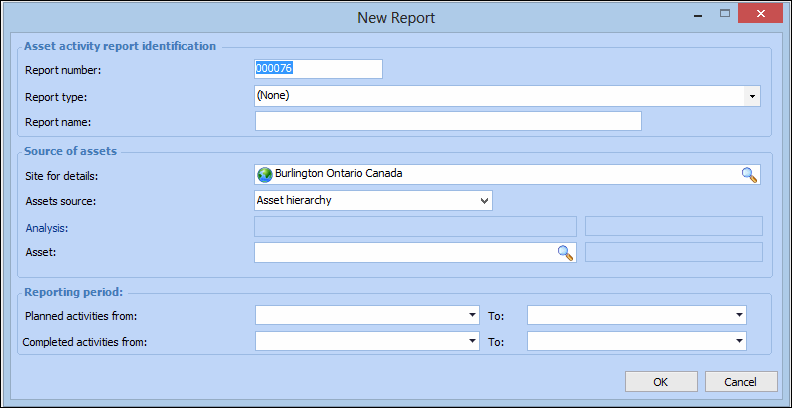
Click New. The New Report dialog appears.
Note: You can also create an asset activity report directly from the Activity Reports view on an asset or strategy development analysis.
3.
4.
In the Source of Assets group, complete the following information:
Select either Asset hierarchy or Strategy development analysis for the source of the assets.
5.
In the Reporting Period group, select the starting and ending dates for planned and/or completed activities that will appear in the report.
6.
When you are finished, click OK. The report is displayed in the list.