Creating a Time-based Rule Clause

Triggering rules are made up of rule clauses. When you create a triggering rule for a standard job or a preventive maintenance (PM) route, you can use both time-based and indicator-based triggers.
Time-based rule clauses can be based on calendar days or “in-operation” days. If you base a rule clause on in-operation days, APM tracks the status of the triggering asset and counts the number of days that the asset had a non-operational status. Only days that the asset had an “operational” status are counted for the triggering rule. For example, if the rule says to trigger the job every 30 days but the asset was out of operation for five days during the 30-day period, the job is triggered after 35 calendar days.
The time interval for a rule clause can be either fixed or variable. For a fixed rule clause, APM always triggers the work order on the time interval that you selected (for example every 30 days).
For a variable rule clause, APM adjusts the next work order’s start date based on the actual completion date of the last work order that was triggered from the job (for example, 30 days after the last triggered work order was closed).
If you are triggering variable work orders for a time period that goes into the future, an initial assumption is made that the work orders will be done on their planned completion date. The system starts counting from the requested completion date of the last work order. The requested completion date is calculated based on the planned start date, plus the total estimated duration of all of the work order tasks. As you complete the work orders, the start dates on the future work orders are bumped forward or brought in accordingly. So if you complete the first work order five days late, the future work order dates are bumped forward by five days.
You can also create a rule clause that is based on a planned shutdown period. In this case, select the shutdown type on the rule clause. Then when you generate PM work orders for that shutdown type, the system evaluates all standard jobs that reference the selected shutdown. Generated work orders are assigned to the next shutdown instance associated with that shutdown type.
This section explains how to create a time-based rule clause. To create a rule clause that uses indicator-based triggers, see Creating an Indicator-based Rule Clause.

To Create a Time-based Rule Clause

1.
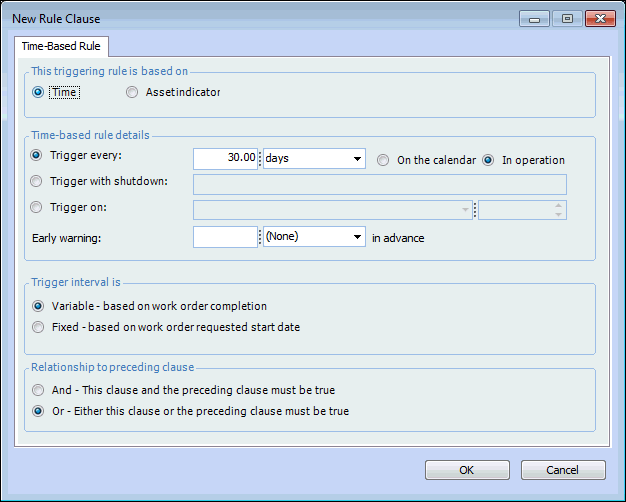
In the New Rule Clause dialog, select Time.
2.
To trigger on a regular time interval, select Trigger every and enter the appropriate interval. For example, select to trigger every 30 days. Select whether the triggering will be based on calendar or in-operation days. You can enter an early warning time for the rule in the Early warning box. For example, you could have an early warning five days in advance of the actual trigger.
To trigger on a planned shutdown period, select Trigger with shutdown and then select the appropriate shutdown from the list. You can also specify the date and time of the shutdown instance.
To trigger on a specific date, select Trigger on and specify the date and time.
3.
If you have selected a regular time interval, select whether the interval is variable or fixed. If you select Fixed, APM always triggers the work order on the time interval that you select (for example, every 30 days). If you select Variable, APM adjusts the work order start date based on the completion date of the last work order that was triggered from the job (for example, 30 days after the last triggered work order was closed).
4.
5.
Click OK to save the rule clause and close the dialog.