|
Creating a Scheduled Action
• Calculate failure remaining P-F interval: Updates the P-F interval on all open failure records. If your organization tracks failures, schedule this action to run daily or more frequently if P-F intervals are less than one day.
• Calculate failure statistics: Calculates the time between failures (TBF), time between repairs (TBR), and time to repair (TTR) on selected failure records. If your organization tracks failures, schedule this action to run daily. The following failure records are processed:
• Check for expiring contracts: Reviews the expiry date on all contracts. If any are at or past the expiry date, the system sets the contract status to “expired”. If expiry notification is being used and any contracts are in the notification period, the system sends the selected expiry notifications.
• Close completed tasks: Closes work order tasks that have been marked “Completed” and for which a designated length of time has elapsed since completion.
• Create checksheets for work orders: Creates checksheets for new work orders.
• Create checksheets from maintenance orders: When APM has been configured to interact with SAP Plant Maintenance, this action gets a list of SAP maintenance orders and plans that were created on or after the date set in the site’s interoperability settings. Where applicable, the method updates or creates checksheets in APM.
• Delete expired schedules: Scans the selected sites for schedules that are ready to be deleted. The system deletes schedules that have a planned deletion date and time prior to the date and time that the activity is run.
• Download Online Content: Refreshes the APM cache of available Reliability Online Content: action plans and their indicators.
• Evaluation Inspection Effectiveness: Identifies processed readings that identify an inspection effectiveness value and that were recorded within a specified time period. Using the rules set up for the site, the process calculates the inspection effectiveness value for each indicator
• Evaluate supplier prices: Evaluates and sets the preferred suppliers, current prices, and new consignment prices for resources in the resource catalog.
• Execute 4D Analytics Calculations: Scans for 4D Analytics calculations and processes them.
• Execute purging rules: Scans the selected site for all activated purging rules that are set up to execute automatically and determines which rules need to be executed based on their recurrence patterns. The system executes purging rules that need to be run.
• Expire schedules: Scans the selected sites for schedules that are ready to be expired. The system expires schedules that have a planned expiration date and time prior to the date and time that the activity is run.
• Extract notifications: Creates failures from SAP notifications. This action is available when APM has been configured to interact with SAP Plant Maintenance.
• Fax all documents: Submits documents to be faxed to the MS fax server. You can schedule this action to submit RFQ and purchase order faxes to the fax server. Action scheduler must be set up on the same computer as the APM fax server.
• Fax purchase orders: Submits purchase orders to be faxed to the MS fax server. You can schedule this action if you want to submit purchase orders on a different schedule from other faxed documents. Action scheduler must be set up on the same computer as the APM fax server.
• Fax RFQs: Submits requests for quotation (RFQs) to be faxed to the MS fax server. You can schedule this action if you want to submit RFQs on a different schedule from other faxed documents. Action scheduler must be set up on the same computer as the APM fax server.
• Generate Asset Health Readings: Generates asset health readings for all groups.
• Generate Asset Product Capacity: Generates production capacity records for assets and product
• Generate Asset Program: Generates a set of indicators, tasks, jobs, and documents for the site’s assets.
• Generate Checksheet Requests for Work: Generates a request for work for checksheets that are within the triggering horizon and are ready for a request for work.
• Generate Indicator Collection Audits: Scans the selected site for indicator collection audit reports that are set to run automatically. This can also be run manually for an asset and its indicators.
• Generate PM Work Orders (Scheduled): Runs the preventive maintenance generation profiles that are triggered automatically based on a recurrence pattern and that are due to be run. This action can also be run manually for a site or an asset and its descendants.
• Generate Standard Task Checksheets: Scans APM for standard tasks for which due dates are tracked and that support generating checksheets. Creates checksheets for tasks based on their due dates within the generation horizon.
• Link Checksheets to Work Request: Links checksheets to interop work requests.
• Map Characteristic Values to Work Document Properties: Maps characteristics values to the Interop work document properties.
• Map Characteristics to Asset Properties: Maps the values in the asset characteristics to asset properties.
• Post maintenance costs: Posts costs for all transactions charged to work orders and assets. You must run this action in order to see cost summaries on assets (the Maintenance Costs view). This action can also be run manually from site.
• Process activity reports: Processes all unprocessed activity reports for a site.
• Process failure mode copies: Processes all pending failure mode copy requests.
• Process inbound messages: Checks the CMMS XML folder for XML files that contain incoming events, such as closed work orders or updated standard tasks or standard jobs. (Not available for sites where EAM is activated.)
• Process Interop Data Readiness Requests: Processes Interop data readiness requests with the status “Ready to process”.
• Process outbound messages: Polls APM for integration events that are waiting to be processed or retried. The information is communicated to the CMMS. If the CMMS is not available when the event is processed, the integration event is failed. (Not available for sites where EAM is activated.)
• Process ready checksheets: Processes checksheets with the checksheet status of “Ready to process”.
• Recalculate approval routes limits: Converts the maximum approval limits on your approval routes from the routes’ site currencies to the enterprise currency using the current exchange rates. If you have sites with different currencies, schedule this action to occur with the same frequency as currency exchange rates are updated.
• Recalculate calculated indicators: Recalculates the value of calculated and performance indicators based on the recalculation frequency specified. You should schedule this action if your organization uses calculated or performance indicators.
• Recalculate Balances: This action recalculates the Replenishment Demand, Reserve Demand, and On-Order inventory balances for all of your warehouses.
• Refresh Asset Health Assets: Refreshes the list of assets for all asset health report definitions that are due to be updated.
• Refresh Checksheet Readings: Updates the readings on checksheets that are currently within their refresh window.
• Refresh registration of Reliability Online Content: Updates the APM cache of Reliability Online Content registration information.
• Release held work order tasks: Releases any holds that have passed their release date.
• Reset invoice voucher number: Resets the next invoice voucher number back to 1.
• Support Multi Threading of Checksheet Generation: Supports multi-threading of the checksheet generation for Interop work orders.
• Trigger Scheduled Calculations: Generates any triggered calculations that are due to be processed for all sites. This action can also be run manually from the enterprise.
• Trigger Solution Packages: When AssetWise Enterprise Interoperability is active, creates requests for work for solution packages that are due to be triggered.
• Update Asset Age: Updates the age of assets as determined by the Asset age calculation settings.
• Update Checksheets with SAP Order Values: When APM has been configured to interact with SAP Plant Maintenance, this action updates open checksheets’ order statuses and dates with the current values of SAP maintenance orders.
• Update Content and Recent Activity: Updates a private library with new or changed analyses and recent activity. Works with Reliability Online Content.
• Update Fluid Sample Results Required In: Calculates the remaining days for all fluid samples waiting for the analysis to be completed.
• Update Indicator Collection Window Status: Applies the current compliance horizon value (default 30 days) to update indicator collection windows, table configurations, and charts.
• Update Open Override Incidents: Updates the remaining time and other information on any open safety override incidents.
• Update Production Loss Events Allocations: Updates the allocations on open production loss events.
• Update Safety Provision Risk Levels: Updates the risk levels on this site’s safety provisions. This information is shown in the Safety Provision Version window, Usage view. Note that historical and canceled provision versions are not updated.
• Update trigger status: Updates the current triggering status of standard jobs. You will need to schedule this action if your organization will be using standard jobs or PM routes that are triggered with time-based rule clauses. For example, you might have standard jobs that are set up to create work orders every 30 days. This procedure updates the triggering status of these types of jobs. This way, the APM users who plan jobs and work orders will always have the most up to date triggering information.
• Upload Content: Uploads your content to the APM Online Content Library.To Create a Scheduled Action
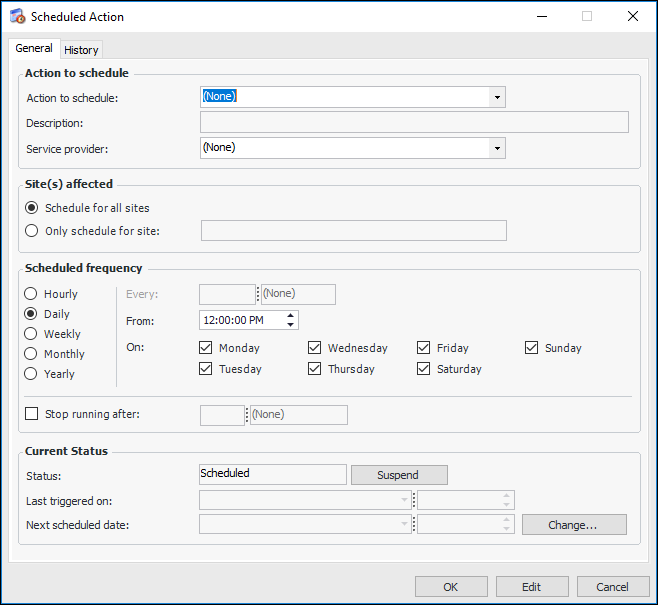
2. Select the Services view and the Scheduled Actions tab. Click New. The Scheduled Action dialog appears.
3. Click the Action To Schedule list and select an action.
5. If you want to restrict this action to run for a single site, select Only Schedule for Site and select the site on which this action will run. For example, you might want to create a different schedule for processing activity reports on each site.
6. Define the Scheduling frequency for the action. See “Defining Recurrence Patterns”, below.)
7. Select Stop running after and specify a time period if you expect that the volume of actions will be large enough to affect system performance.Note: If you decide to suspend the scheduled action from running, click Suspend in the Current status area. When you are ready to start the action again, click Re-activate.
8. Click OK to save the scheduled action and close the dialog.
9.