Creating an Invoice Entry Batch

An invoice entry batch is a collection of invoices that are being entered and balanced as a group. The purpose of the batch is to ensure that all of the invoices have been entered and that the amounts entered are correct. The use of invoice batches is optional.
If an invoice is included in a batch, the invoice cannot be posted until the batch is balanced and posted.
A new invoice can be created as part of an invoice batch or on its own. This topic explains how to create a new invoice batch.

To Create a New Invoice Batch

1.
Select the site’s Invoicing view, Invoices tab, and then the Batches tab.
2.
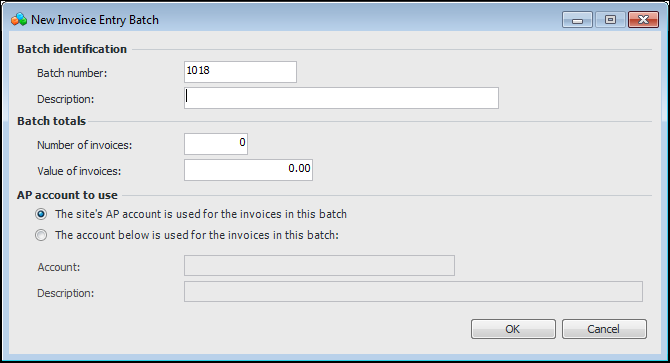
Click New. The New Invoice Entry Batch dialog appears.
3.
4.
Enter a Description of the batch.
5.
6.
Select the AP account to use with this batch:
7.
Click OK to create the batch. The Invoice Entry Batch window appears.
8.
Select the Invoices tab and add invoices or credit memos to the batch:
To add a credit memo, click the New list and then Credit Memo.
The New Invoice dialog appears.
9.
For detailed instructions on completing the dialog, see Entering an Invoice or Entering a Credit Memo.
10.
Repeat steps 8 to 9 to create all of the invoices or credit memos in the batch.
11.
12.