
Assigning Calculation Variable Limits and Weighting
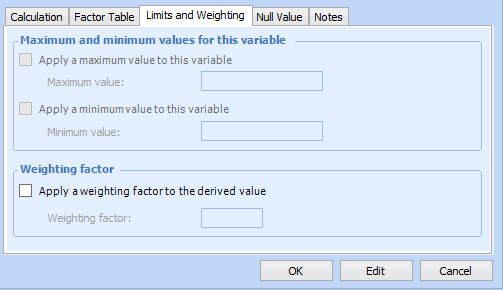
Limits and weighting can be applied to an asset health derived value. A derived value is the raw value returned from an asset health calculation variable, for example, the age of pump assets.
For each asset health calculation variable, minimum and maximum limits can be assigned to the derived value. When assigned, these values define the maximum and minimum allowed values for a derived value.
If a maximum limit is assigned, the derived value is compared to the maximum limit. Only if the derived value is greater than the maximum limit will the variable result be assigned the maximum limit value; otherwise, the derived value remains unchanged. For percentage values, the result would be assigned a value of 100%. For example, if a variable returns a derived value of 9 and the maximum limit is 7, the derived value is given a value of 7. If the result is to be presented as a percentage, the value in this example would be 100%.
If a minimum limit is assigned, the derived value is compared to the minimum limit. Only if the derived value is less than the minimum value will the variable result be assigned the minimum limit value; otherwise, the derived value remains unchanged. For percentage values, the result would be assigned a value of 0%. For example, if a variable returns a derived value of -.05 and the minimum limit is 0, the derived value is given a value of 0. If the result is to be presented as a percentage, the value in this example would be 0%.
You cannot assign both a factor table and limits to a variable at the same time.
Weighting can also be applied to numeric derived values, assigning more importance to one result over another. When a derived value is weighted, it is multiplied by the weighting value. Any limits or factor table assignments are always applied prior to applying weighting.
For variable results with limits and weighting, the derived value is first compared to the assigned limits, reassigned according to the minimum or maximum values if necessary, and then the weighting is subsequently applied.
For variable results with weighting and factor tables defined, the factor table values are applied first, and then the weighting is subsequently applied. For more information on factor tables, see Defining a Factor Table for a Variable.
For more information about creating calculation variables, see Creating Calculation Variables.
This topic describes how to assign a calculation’s limits and weighting.

To Assign Calculation Variable Limits and Weighting

1.
2.
Select the Limits and Weighting tab. For example:
3.
Select Apply a maximum value to this variable and enter a maximum value if you want to assign a maximum value to the derived value.
4.
Select Apply a minimum value to this variable and enter a minimum value if you want to assign a minimum value to the derived value.
5.
Select Apply a weighting factor to the derived value to apply a weighting factor to derived values.
6.
When you are finished, click OK to save the variable and close the dialog.