Costs and Indicators for Assets

You might need to rebuild maintainable or component assets from time to time. You can track the costs and cumulative indicator readings that the asset accumulates during each rebuild (or asset life). This APM feature is called Asset Life Support. This topic explains concepts that you need to understand to use the Asset Life Support feature.

Asset Life

The lifetime of a maintainable, system, sub system, or component asset starts when it is purchased and lasts until it is scrapped. However, over the course of its lifetime, the asset can be rebuilt several times and restored to a “like new” condition. In APM, each of these restorations can mark the beginning of a new “asset life.”
In APM, an asset can have any number of lives. Each life is tracked with a number, a start date, and an end date. APM tracks costs and cumulative indicator information for each asset life, similar to the tracking for financial periods. In a multi-site environment, asset costs are tracked separately for each site where the asset is installed so that differences between site currencies are accurately reflected.

Starting a New Asset Life

The first asset life begins automatically when the maintainable or component asset is brand new. When you restore the asset to a like-new condition, for example as the result of a rebuild, you can begin a new life for the asset.
When a component is to be rebuilt, it is usually removed from its location and sent for repair. As the work progresses, you can track changes in the component’s status in APM. For example, you can record when a component is removed, sent out for repair, returned for inspection, made available, and then finally re-installed in a new location. You can indicate that the component’s next life has begun during any of these stages. Usually, you will start the next asset life when the restored component is installed in its new location.
You can track changes in a maintainable asset’s status in APM. Whenever you change the status for a maintainable asset, you can indicate the asset’s next life has begun.
TOP

Asset Life Costs

When costs are charged to an asset, APM assigns the cost to the appropriate asset life. APM determines which asset life to assign the cost to based on the date that the cost was charged. The costs in each asset life are categorized by cost type similar to those for each financial period.
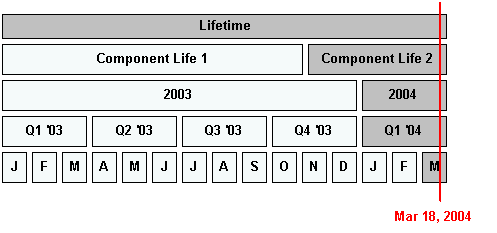
The diagram below shows the asset life and financial periods that would be affected by a transaction that was processed on March 18th, 2004. If the amount of the transaction is $100, then APM would add $100 to the current value of the lifetime and financial periods shown in grey.
APM separates asset costs according to site so that differences between currencies are accurately reflected. An asset that has been transferred between sites has separate life-to-date, asset-life, and financial period costs for each site.
TOP

Asset Life Indicator Readings

APM summarizes readings for cumulative indicators for each asset life and financial period, similar to how costs are summarized. When you enter an indicator reading, APM determines which asset life and financial period it should be assigned to.
The example in the diagram below shows the lifetime and financial periods that would be affected by an odometer indicator reading that was entered on March 18th, 2004. APM determines which financial periods the reading falls in, and updates each period with the reading amount. The affected periods are shown in grey.
TOP