Contracts Overview

A contract identifies that a formal pricing agreement exists between your organization and a supplier. Each contract includes purchasing information for one or more resources. The contract identifies the prices, terms and conditions for the purchases of those resources during the effective period of the contract.
This topic explains concepts related to creating and working with contracts in APM.

Contract Life Cycle

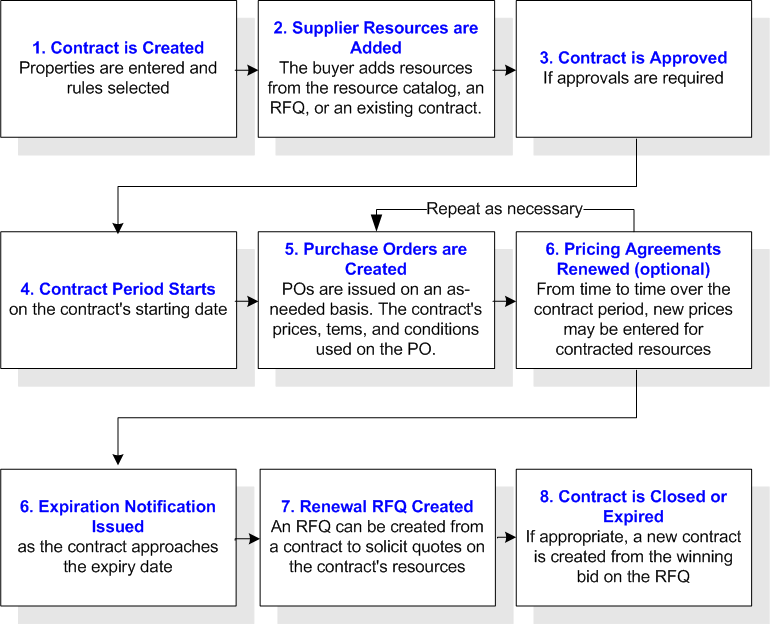
The following graphic illustrates the life cycle of a contract:
TOP

Information Included on a Contract

The contract information is divided between the contract summary information and the resources covered by the contract.
At the summary level, you can enter the following settings:
For each contracted resource, you can enter the pricing information and any resource-specific terms or conditions.
TOP

Terms and Conditions

A standard set of purchasing terms and conditions can be defined on the contract. The contract’s terms and conditions consist of the FOB point, freight terms, shipping method, and payment terms. The contract’s values are defaulted to all purchase orders created for the contract.
You can set a rule on the contract indicating whether the terms and conditions are guidelines only or fixed values. Fixed values are not normally changed on the contract’s purchase orders. To handle situations where the terms and conditions have to be changed for a rush order or similar exception, you can change the values from the contract on a purchase order.
TOP

Fixed Prices

Contracts typically represent a firm agreement between the customer and supplier to supply the resources at the agreed-upon prices, terms, and conditions. If the contract information is fixed, it should not be changed on requests or purchase orders.
You can indicate whether or not the contract’s prices and terms are fixed. Information that is fixed cannot be changed on purchase demands or purchase order lines that reference one of the contract’s prices. As with the terms and conditions, you can change the prices in special cases.
TOP

Supplier Resource Defaults

The contract’s supplier resource information rule controls whether the contract’s supplier resource values can be changed on supplier resource records or not. These values are pricing agreement effective and expiration dates, discount percentage, extra charges, primary supplier setting, and the replenishment rule. If the values are fixed, they cannot be changed on the supplier resource. Any changes to the contract’s values are automatically applied to the supplier resources.
If the contract’s information varies on the supplier resources, choose the “information is default values only” setting. The contract’s information is defaulted onto new supplier resources where it can be changed. Changes to the contract’s information are not applied to the supplier resources.
TOP

Combining Purchasing and Supplier Resource Rules

The purchasing rules and supplier resource rule may seem similar, but they serve different purposes:
Depending upon the circumstances, the following situations may be valid:
TOP

Multiple Pricing Agreements

Two types of contracts exist with respect to pricing agreements. The first, and more common, is a contract where both the contract and the pricing agreement have the same effective period. In effect, the contract has one pricing agreement. The pricing agreement (i.e. prices) is in effect for the length of the contract.
With the second type of contract, multiple pricing agreements exist over the life of the contract. For example, you may have a 5-year contract with a supplier. While the general contract runs for the full 5 years, the prices are renewed every year.
Renewing a contract’s pricing agreement is different than renewing the contract. When a contract is renewed, an RFQ is created to manage the bid process. Multiple suppliers are asked to bid on the new contract.
Renewing a contract’s pricing agreement does not involve an RFQ. No other suppliers are asked to bid. Only the contract supplier’s new pricing information is entered. When you renew a pricing agreement you can:
If necessary, you can edit individual new prices after they have been created.
TOP

Replenishing Contracted Resources

Contracted resources do not typically require review before being replenished. The existence of the contracted price indicates that the supplier selection is correct.
If necessary, you can set a rule on the contract to indicate that replenishment review is required. If replenishment review is not required, the resource is immediately ordered.
TOP

Contracts vs. Blanket Orders

Contracts and blanket orders are similar documents. They have many of the same features, but there are differences:
For more information on blanket orders, please see Blanket Orders and Releases.
TOP

Checking for Expiring Contracts

A contract’s expiration notification and expiry dates indicate when a contract’s expiration notification should be issued (if notification is being used) and when the contract is expired.
Setting a contract to the expired status prevents new purchase orders from being issued against the contract. When the contract is expired, the system re-evaluates the primary supplier setting for all of the contract’s resources.
In order for notification and expiry to work, the Check for Expiring Contracts method should be run daily. When you run this method, the system reviews each open contract’s expiry dates, as well as the expiry dates for the contract’s pricing agreements. Your system administrator can schedule this method for the site. You can also run the Check for Expiring Contracts method manually from the site’s Tools menu.
TOP

Expiration Notifications

Once the expiration notification has been issued, you can proceed in a number of ways. If the notification was prior to the contract expiration:
If you received the notification prior to the pricing agreement expiration:
TOP

Renewing a Contract

The process of renewing a contract normally starts with the issuing of the expiration notification. If you are not using expiration notification on the contract, you can simply start the renewal process at the appropriate time.
To renew a contract, simply create a renewal RFQ. The system can automatically generate the renewal RFQ as part of the expiration notification, or you can create one manually. You can also create an RFQ from a contract that has already expired. The following information is copied from the contract to the renewal RFQ:
Once the RFQ is created, you can review and update it as required. For example, you may need to add or remove resources or bidding suppliers. Once the RFQ is ready, you can follow the normal RFQ process. After you have received and analyzed the bid, you can create a new contract for the winning supplier.
The existing contract can continue to be used until it expires. After the contract has expired, the contract’s supplier prices will no longer be valid.
TOP

Multi-site Considerations

A purchasing contract can be used to create purchase orders:
Both the contract and the supplier resources referenced on the contract must be at the same site.
TOP