|
Configuring ODC Reading Creation Rules
To Configure an ODC Reading Creation Rule
1. Note: The ODC tab only appears if the collection method is set to Collected from an on-line source on the General tab.
2.
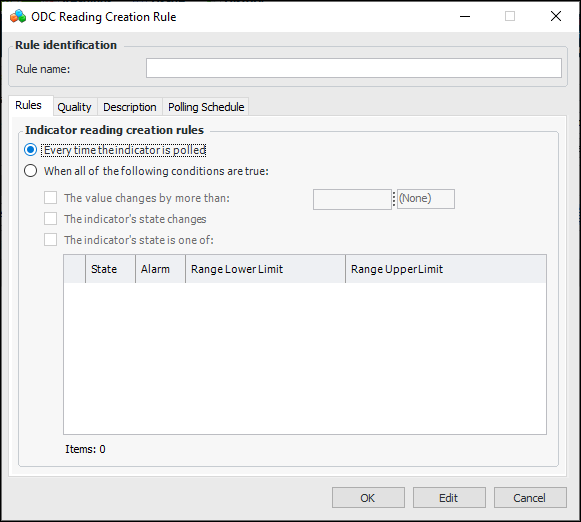
• Every time the indicator is polled: select this option to always have a reading created when data is received from the tag.
• When all of the following conditions are true: Creates a reading under the conditions that you define on the rule. You can use any combination of the options below the rule to evaluate whether a new reading should be created. If you select more than one option, the evaluation criteria will be logically “ANDed” together. This means that a reading will only be created if all of the criteria are true. You must select at least one option.
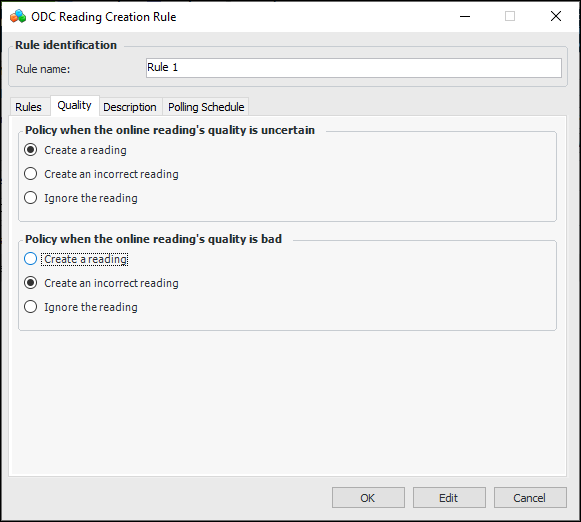
5. Select the Quality tab.
7. On the Description tab, you can enter a information about the rule.
8. Select the Polling Schedule tab.
9. Click Browse and select a polling schedule.
10. Click OK.Note: Any time that you make a change to a polling schedule or an ODC indicator, you must refresh the ODC service provider. From the Enterprise window, click the Services view and then the Servers tab. Locate the service provider, right-click it, and click Refresh Service.