Capital and Operational Project Management

APM project functionality allows you to track projects in your organization with respect to costs, hierarchy relationships, and status. The costs and completion status of a project are tracked through the work orders charged to the project. Most project work is done through work order tasks. Your projects can be tied to GL account segments that are applicable to the particular cost types within the project, such as materials, labor, and parts.
Projects can be linked to several types of analysis and objects such as failures and safety provision versions.
The following sections outline concepts related to projects.
Note: APM also supports reliability projects, which are used to track analyses and other objects, usually in APM implementations that exchange data with external CMMS systems using AWEIS. These projects use project tasks, rather than work orders, to track work. For more information, see Reliability Project Management.
This topic explains:

Capital Projects

Capital projects are new construction, major repair, or improvement where the cost is capitalized rather than expensed. Capital projects increase the total asset value of the organization. Typically, they have the following attributes:
The APM project’s functionality is intended for use with maintenance projects.

Operational Projects

Operational projects are new construction, major repair, or improvement where the cost is expensed. Within APM, there are no significant differences in the functionality of operational and capital projects. The difference lies in the accounts charged. The account charged is determined on a project by project basis.
TOP

Project Hierarchy

The project hierarchy allows you to break a project down into any number of sub-projects and levels. In addition to providing a graphical view of the project structure, the project hierarchy is used to push a project’s approval status down the hierarchy. When a higher-level project is approved, sent for approval, redrafted, or rejected, the status can be applied to the project’s sub-projects.
The hierarchy is also used to:
If the project hierarchy spans sites with different currencies, the estimated costs and cost summaries of the sub-projects are converted to the currency used at the parent project’s site
The project’s actual costs are equal to the costs charged to the project’s work order tasks, plus the costs charged to the project’s sub-projects.

Approvals Process

Your site’s approval settings determine if projects require approval. When a project is sent for approval, the route selected is based on the project that is being approved. Each approval route for projects can identify the project or projects it can be used with. Alternatively, on the project itself, you can add the project to a new or existing route. Approval route selection is not based on the project’s GL account segment.
For approval purposes, the value of the project is determined as follows:
The system uses the project hierarchy to push the project’s approval status down to the sub-projects. When a project’s approval status changes to “sent for approval”, “approved”, “rejected”, or “redrafted”, the status is also applied to all of the project’s sub-projects. The project’s approval status is not applied to sub-projects that are being approved separately.
Project statuses are flexible. Depending on your site settings, certain actions (such as editing) might or might not be allowed when a project is waiting for approval, approved, or rejected.
See Approving Documents for more information on the approval process in APM.

Effect of the Project Hierarchy on Approvals

The project hierarchy is used in two ways by the approval process. First, the costs of a project’s sub-projects are rolled up the hierarchy to determine the value of the project for approval purposes.
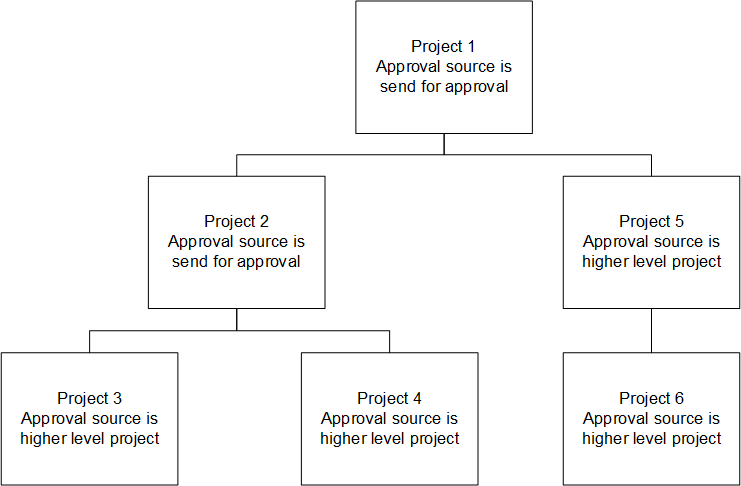
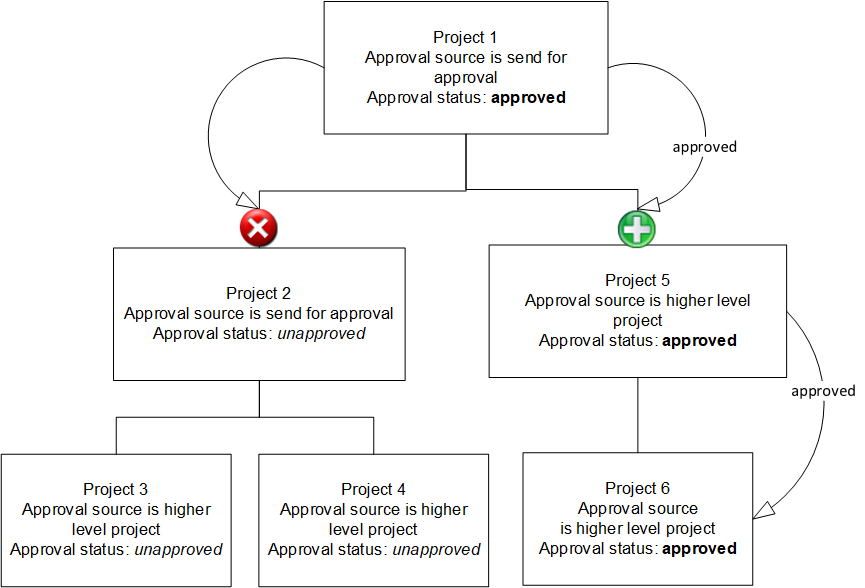
The second way in which the hierarchy is used is to push the approval status down the hierarchy. When a project is approved, sent for approval, redrafted, or rejected, the status is also applied to the project’s sub-projects. In case this approach is not appropriate, a rule has been included on the project to allow you to indicate if the project’s approval originates with a higher-level project and approval is pushed down the hierarchy, or if the project is approved separately. If the project is approved separately, the approval status from the higher-level project is not applied; the project is sent for approval independently.
To illustrate, here is the approval process for the project structure:
When project 1 is approved, its approval status is pushed down as follows:

Project Cost Tracking Overview

A project’s planned costs are based on the project’s work order tasks’ planned costs. Work order tasks are the only means of developing planned costs for a project.
As with planned costs, a project’s actual costs are based on the project’s work order tasks and the resource transactions charged to those work order tasks. Resource transactions cannot be charged directly to a project. All project costs originate with resource transactions charged to work order tasks.

Total Cost Types

Using work orders and tasks as a point of reference, the total cost for the work order or task is tracked by including a reference on the work order to its total cost summary. This reference allows you to view the work order’s total costs, planned and actual, as a control, a page or dialog, as a table column, and on reports.
Because projects use work orders to track costs, the same concept applies to projects and includes references to the following sub-totals:
These sub-totals are used by projects and work orders alike to summarize planned, actual, and remaining costs in charts, tables, and graphs. The sub-totals are only valid if you have an appropriate cost type and you point APM to it. For example, if you do not have a total labor cost type or do not point APM to it, the total labor costs for projects will be incorrect.

Project Planning

Project planning activities are performed on projects and through work order tasks. The project is used to identify basic information, while the work orders charged to the project are used in the detailed, task-level planning. The project planning information includes:
Work order tasks are used to provide a more detailed plan for the project. Detailed resource requirements planning is included, for example, labor requirements, stores materials requirements, and direct purchases. Resource requirements are not directly planned on the project.
A project reference is included on the work order task. Any number of work order tasks can reference the same project. The work order task’s project reference is used to:
TOP

Work Breakdown Structure

The work breakdown structure values are used to predefine common project activities. A set of work breakdown structure (WBS) codes is referenced on each project. These are the WBS codes used with the project’s tasks. A WBS code is also specified on the work order tasks and work requests that refer to a project.

Project Hierarchy Code and Location

The project’s hierarchy code and location serve the same purpose as the asset hierarchy code and location.
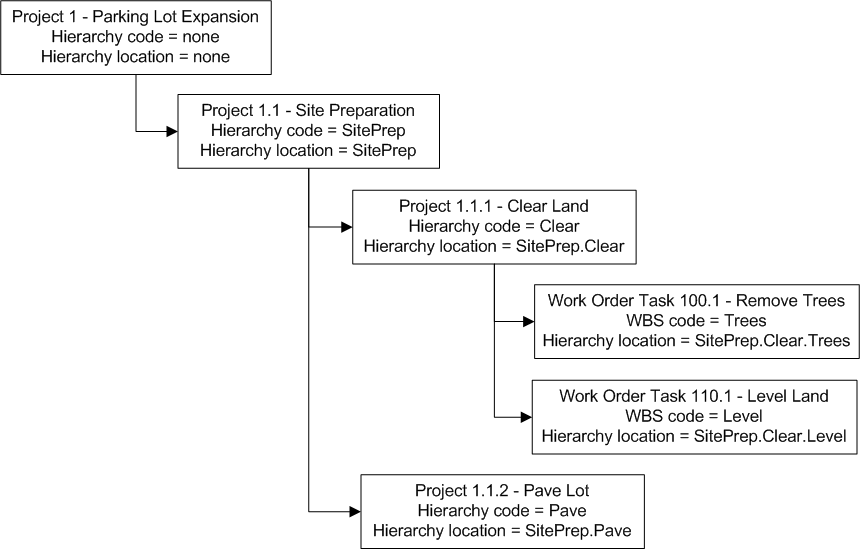
The project hierarchy code allows you to identify a project’s location within the project hierarchy. The hierarchy location contains the project’s hierarchy code concatenated with the hierarchy codes from the project’s parents and higher-level ancestors.
The hierarchy location on the work order task consists of the task’s WBS code plus the hierarchy location from the task’s project. The work order task’s hierarchy location is only used on tasks that reference a project. Here is an expanded WBS code example:
TOP

Project Status and Events

Project status consists of user-defined values that are used to track the progress of each project. Project events and project status controls are linked to project status. The events determine the automatic status changes upon a common project activity, such as sending a project for approval. The controls linked to each status determine the actions that can be taken when a project has a particular status.

Project Events

Events settings allow you to define the status for a number of predefined project actions. The project’s status is automatically changed when the action is performed. For example, when a project’s work orders are closed, its status is automatically set to “closed”.
A project status can be associated with the following actions:

Project Status Controls

Project statuses allow you to control the actions that can be performed on a project. The project’s status is shown in the Project window in the Properties view, General tab. Each project status definition includes the activities that are allowed for that status. For example, whether or not the project’s properties can be changed is controlled by the project status.
The following activities can be controlled by the project status:
 

Approval Process Examples

To effectively use the approvals process and activity controls with projects, you must set up your project statuses in a logical fashion. The project status definition determines the actions that can or cannot be carried out when the project has that status. For example, if you set up a status called “Approved”, it makes sense to disallow the activity “Project may be sent for approval”.
The following table outlines a suggested set of statuses and their controls for use with approvals functionality. Using these settings ensures that the project retains an audit trail where appropriate. You can choose to use these statuses or create your own, depending on your circumstances. The documentation, however, assumes that the status “Approved” is as shown below.


Canceled Project Status

We recommend creating a project status called “Canceled”. The “canceled” status should be allowed to be set manually, on the Options tab, and should cancel all open work orders and tasks attributed to the project, in the status’ Events area. Creating a “canceled” status ensures that all open work on a project is canceled in the event that the project is canceled. You can also have a similar status for On-hold projects, for example.