
|
Linking CPR Action Plans to Projects
To view the projects linked to an action plan, select the Implementation view, Projects tab in the analysis window. When viewing a project, you can see a list of the action plans that are linked to it. See Working With a Project’s Links to CPR Action Plans.To Link an Action Plan to a Project
1.
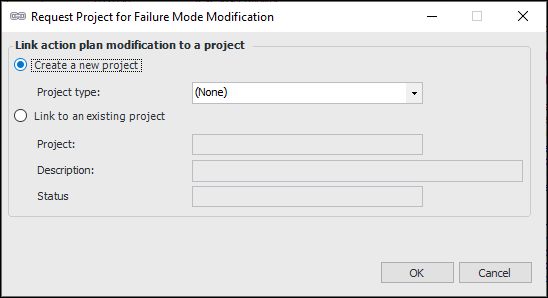
2. Right-click the action plan, click Link to a Project and then Modifications. The Request Project for Failure Mode Modification dialog appears.Note: An action plan must recommend the Modification/redesign action and have the status Facilitation Completed, before the Link to a Project option is available.
• Click Create a new project.
• Click OK. A new project is created and the Project window appears. The action plan is referenced on the Properties view, Action Plans tab.
• Click Link to an existing project.
• In the Project box, click the browse icon () to open the Project Selector dialog. Select the project and click OK. The project name, description, and status are added to the Request Project dialog.
• Click OK. The Project window appears. The action plan is referenced on the project’s list of linked action plans. When you are finished, close the Project window.