Generating Checksheets from Standard Tasks

You can set up standard tasks to automatically generate checksheets and mobile activities on a regular basis without the need for work orders. This is useful in integrated environments where it is not convenient to generate work orders in the CMMS.
Note: This functionality is generally available. To use it in APM, enable feature 51. In the Enterprise window, select the Customization Center view and the Enabled Features tab. Click Browse, select “Support generation of checksheets for standard tasks, without requiring a work order”, and click OK. If APM is running as a smart client, click Refresh Enabled Features on the server. Then restart the client to use the functionality.

To Set up Automatic Checksheet Generation
1.
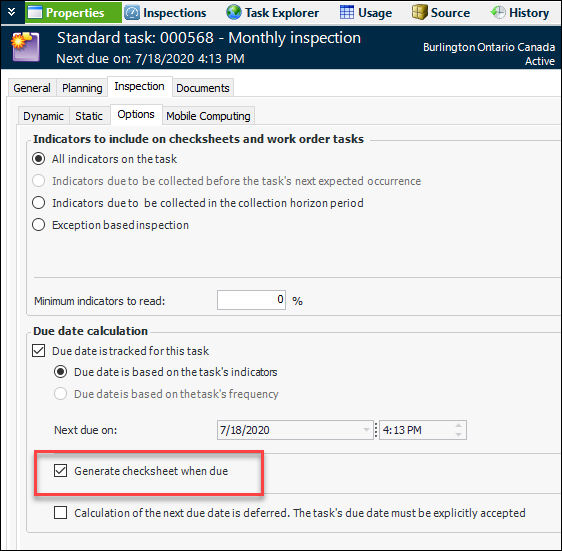
In the Standard Task window, select the Properties view, Inspection tab, Options tab.
2.
Select Generate checksheet when due. For example:
3.
For more information, see Creating a Scheduled Action.
Tip: You can also generate checksheets manually for testing purposes. In the Site window, click the Tools menu, Inspection Management, and then Generate Standard Task Checksheets.
4.
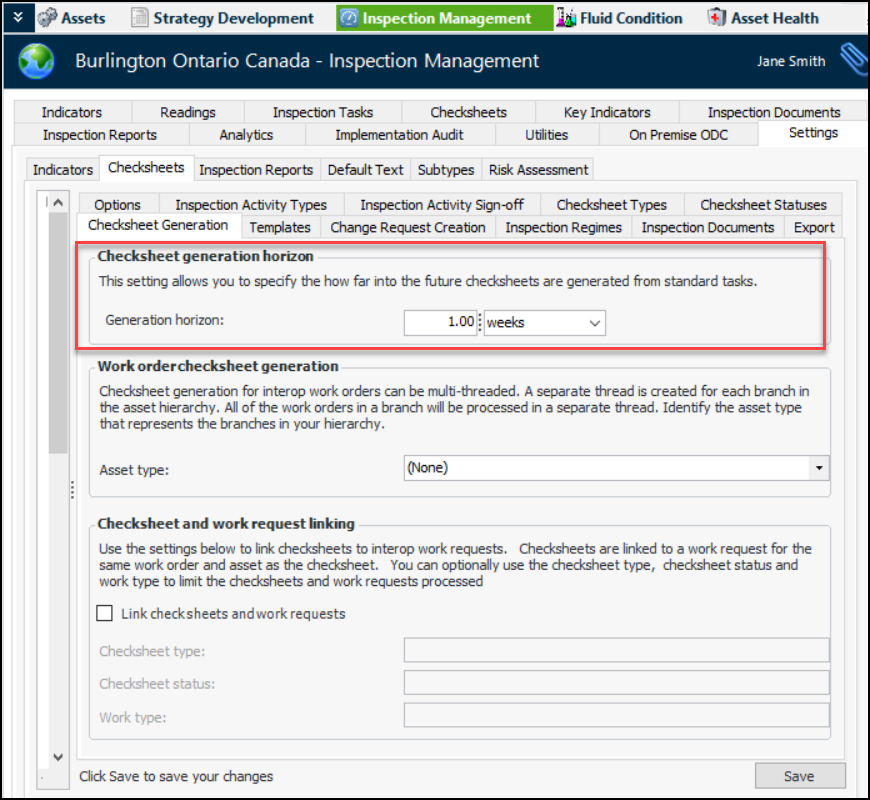
The checksheet generation horizon for standard tasks is set to one week by default. You can change it by selecting the Inspection Management view, Settings tab, Checksheets tab, and Checksheet Generation tab.
5.
Click Edit. The button changes to Save.
6.
To support the checksheet generation feature, due-date tracking options have been added to standard task templates and APM Remote standard tasks.