|
Assigning an Asset Activity Report Team
To Assign an Asset Activity Report Team
3.
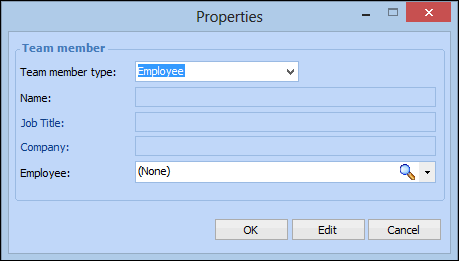
4. Click New to add a report team member to the report. The team member Properties dialog appears.
If the team member you are adding does not have an APM employee record, select Consultant and provide the member’s name, job title, and company or department.If the team member is also an employee, select Employee and browse or select the employee from the list.
6. Click OK. The report team member is added to the list.
7.
8. By default, the Report author is the employee who created the report. If you want to change the author, select a different team member from the list.
9. To remove a team member from the list, right-click the team member in the list and select Delete. A confirmation message appears. Click Yes to remove the member from the team.