
Introduction to Asset Change Requests

Change requests specify updates to be performed on assets in the external CMMS (for example, SAP) that manages assets and work. AssetWise Enterprise Interoperability (AWEIS) conveys requests to the CMMS and returns information to APM. The asset update is performed in the CMMS and then information such as a new equipment number is communicated back to APM, where the interop asset is updated.
There are five varieties of asset change request:
Note: To use asset change requests in APM, you must first enable feature 28. To create asset properties change requests, enable feature 55. In the Enterprise window, select the Features view and the Enabled Features tab. Click Browse, select “Asset change requests” and “Ability to request changes to an asset properties outside of a construction form”. Click OK. If APM is running as a smart client, click Refresh Enabled Features on the server. Then restart the client to use the functionality.
Characteristic mapping is used to populate the properties of CMMS objects with matching properties from the request. For example, a characteristic map set for equipment removal requests might copy the work order number and removal date to the equipment. Construction form change requests might include the work order number and construction form header properties.
This introduction explains:
For related information, see:

Asset Properties Change Request Process

The process begins when you identify an asset to update and then initiate the creation of the asset change request. The process ends when the asset is updated in the CMMS and then in APM.
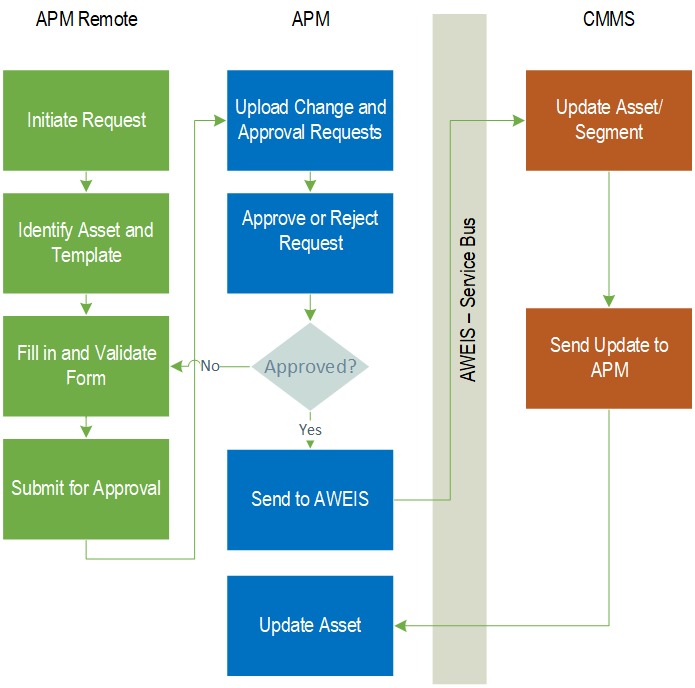
The following illustration shows the asset change request process when it originates in APM Remote and includes the approval process.

Create the Request

Site window, Assets view, Change Requests tab
Asset window, Properties view, Change Requests tab
Construction Form window, Details view and tab for a validated form

Approve and Submit the Request

Update Asset Records

Asset Change Request Template

A change request template defines the content and behavior of change requests that update asset properties. A template is required for each of the asset types that typically warrant property change requests. On asset types, you can specify default templates.
Each template includes:

Approval or Review Process

You can implement the review or approval process for an asset change request. Asset change requests created in APM Remote are reviewed or sent for approval when they are uploaded to APM.
The informal review process provides an alternative to the formal approval process. Rather than being submitted for approval, the request is marked as ready for review. As many as three reviewers with the appropriate security privileges mark a request as reviewed or needing rework.
The approval process is a formal process that uses APM approvals functionality. When asset change requests are submitted for approval, one or more approvers are required to approve the request before it can be sent to the CMMS.
Note: Support for approving or reviewing asset change requests is available as a Technology Preview. To use it in APM, you must first enable feature 56. In the Enterprise window, select the Features view and the Enabled Features tab. Click Browse, select “Review or approval support for asset change requests”, and click OK. If APM is running as a smart client, click Refresh Enabled Features on the server. Then restart the client to use the functionality.

Setting up Asset Change Request Functionality

Setting up APM for asset change requests involves the following tasks:
See **Setting up Asset Types
Note: A banner appears at the top of the Asset Change Request window if asset change request statuses have not been assigned to interop statuses. Click the Edit Settings button to assign an asset change request status to each of the Sent, Accepted, Rejected, and Error interop statuses.
See Setting up Asset Change Request Statuses
See Setting up Change Request Events: Rules for Assigning Statuses
See Setting up Asset Change Request Types
See Setting up Characteristic Mapping for Asset Change Requests
See Setting up Asset Change Request Templates
See Approvals Settings