Adding Warranty Information to an Asset

You can add warranty information whenever you purchase warrantied services or equipment. A warranty can be added for either the supplier or the manufacturer of the item, or the warranty can be linked to both a supplier and a manufacturer.
You can enter warranties based on time, units (for example, kilometers), or both. When you check the warranties for an asset, the system displays only warranties that are currently valid. For example, if the asset has a warranty for six months but the warranty has expired, APM does not display that warranty.
If a warranty is based on units, the units entered on the warranty should be in the same unit of measure category as the asset’s primary cumulative indicator. For example, if a truck has a warranty for 100,000 kilometers, the truck’s primary indicator should be an odometer-type indicator measured in miles, kilometers, or any length unit of measure. This way, the system can check whether or not the warranty is still valid.
This topic explains how to add a warranty record to an asset. Warranties can only be added to maintainable, system, subsystem, or component assets.

To Add a Warranty to an Asset

1.
2.
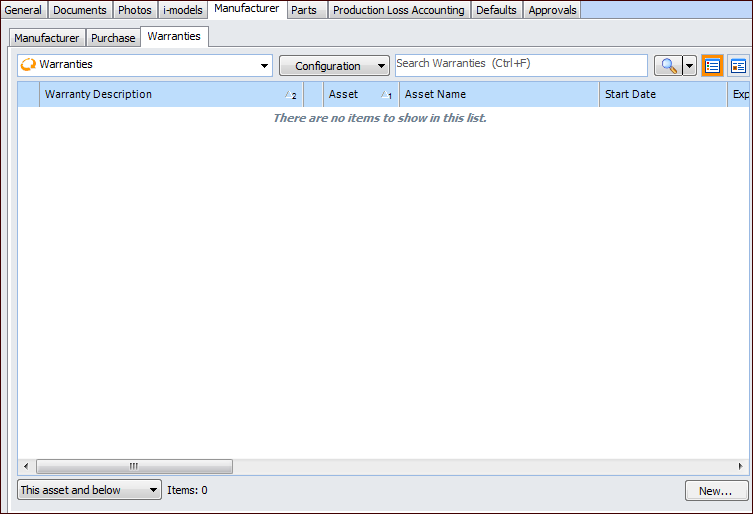
On the Properties view, select the Manufacturer tab and then the Warranties tab.
3.
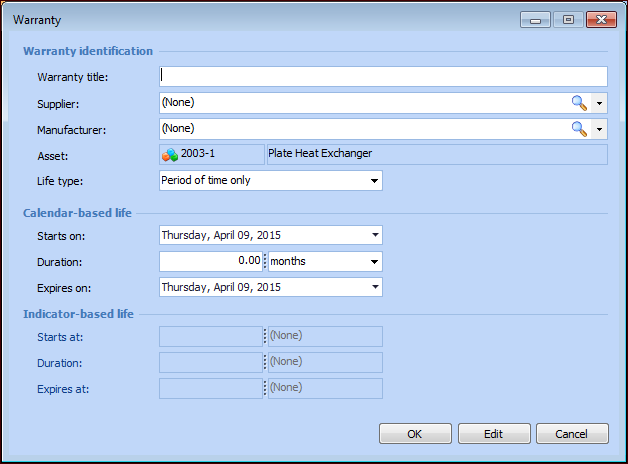
Click New. The Warranty Properties window appears.
4.
5.
6.
7.
Period of time only: The warranty covers only a specific period of time (for example, two years).
Units only: The warranty is valid for a defined number of units (for example, 100,000 km). If the asset has a primary indicator, use the same units as used by the indicator.
Both a period of time and units: The warranty is valid for a specific period of time and a defined number of units (for example, 100,000 km and two years). If the asset has a primary indicator, use the same units as used by the indicator.
8.
9.
Save the warranty and close the window. APM saves the warranty information and displays it in the Warranties list. You can also view this warranty information from the manufacturer or from the supplier.