Overview of Assets

Assets are physical pieces of equipment that your organization must maintain so that it can meet its goals. In APM, each asset has an asset record. APM uses this asset record to keep track of all the information related to that asset. You can create records for all of your organization’s assets, organize them into hierarchies, and perform tasks on them such as creating work orders.
This topic explains asset classifications and types, as well as other concepts in the APM software that relate to assets. You need to understand these concepts to implement and maintain the APM system for your organization.

Asset Classifications

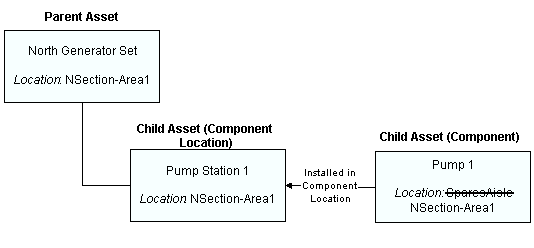
Most asset records represent physical pieces of equipment, such as motors, assembly lines, and fans. An asset can be a single piece of equipment (such as a tank) or an assembly (a group of equipment that works together, such as a pumping system). When an asset is made up of other pieces of equipment, each of the pieces is called a component. For example, a pumping system could have a pump and a motor as components. Assemblies have more than one asset record: they have a record for the overall assembly and records for the component locations and components.
In APM, asset records can also represent other things. For example, you can set up departments as organization assets and add them to your asset hierarchy. Or you can create asset groups that represent assets of a particular type. Assets can also be grouped into systems and subsystems.
APM comes with seven classifications of assets: Maintainable Asset, Component, Component Location, System, Subsystem, Organization, and Asset Group. Each classification has distinct characteristics (described below). When you create an asset, you must create it under one of these classifications. Selecting the correct classification is important, as it affects how APM treats the asset.

Maintainable Assets

A maintainable asset is an asset that you perform work on. For example, tanks and pumping systems are maintainable assets. Measurement devices can also be defined in APM so that you can track testing, calibration, and repair activities for them, as well as the indicator readings where they are used to gather data.
Users can write work requests and work orders for maintainable assets. You can also charge costs to maintainable assets. A maintainable asset can have a parts list associated with it so that users can easily find the proper parts for the asset.
Maintainable assets can have any number of asset lives. Each life has a system-assigned number, a start date, and an end date. Indicator, costs, and manufacturer information about the asset are tracked by asset life.

Component Assets

Components are pieces of larger assets. For example, a pumping system could have a pump and a motor as component assets. Components can be worked on: users can write work requests and work orders for components.
You can charge costs directly to components. Those costs are shared with the component’s location and its parent asset in the hierarchy. A component can also have a parts list associated with it so that users can easily find the proper parts.
Components can be moved from one piece of equipment to another (swapped). If your organization treats components as resources, you can include a resource number on the component as a cross-reference. A component is usually installed in a component location. You can define the location when you create the asset, or you can install the component in the proper location later.
In most cases, you will not add components directly into the asset hierarchy. Instead you will install them in component locations. If a component is a spare and not installed anywhere, but you still want to see it in the hierarchy, you can use a “spare” asset group as the parent asset.

Component Locations

Component locations indicate where a component is located on a maintainable asset or in an asset group. For example, the location of the pump (component) on the pumping system (maintainable asset or asset group) is the component location. Component locations can be worked on: users can write work requests and work orders for component location assets. Component locations are also often the assets that you charge the costs for the work to. Those costs are shared with the installed component, the parallel location (if it exists), and its parent asset in the hierarchy.

Organizations

Assets with this classification represent organizational units (for example the Packing Department). You might use assets with this classification to represent departments in an asset hierarchy. Organization assets group other types of assets so that you can view costs at appropriate levels.
Organization type assets cannot have parts lists, purchase and warranty information, or detailed descriptions. They cannot be treated as resources.

Systems

You can use asset systems to collect similar assets together that represent a system. In doing so, you can make it easier to search them or to compare data on similar assets. Gas treatment systems and water distribution systems are two examples of system assets. Systems generally contain one or more subsystem assets. These assets have the same features as maintainable assets.

Subsystems

You can use subsystems to collect similar assets together that represent an integrated part of a system. For example, a gas treatment system might include separate heating, cooling, and dehydration subsystems. A water distribution system might contain mixing and settling subsystems. A mixing subsystem might contain a mixing tank, mixing motor, and mixing pump. These assets have the same features as maintainable assets.

Asset Groups

You can use asset groups to collect similar assets together to make it easier to search them or to compare data on similar assets. For example, you might wish to group all 100hp motors together.
If your organization uses assemblies with components and component locations, you might want to set up an asset group for spare component assets. The “Spare” asset group provides a parent asset for components that are not currently installed in a component location.
Asset groups cannot have parts lists, purchase and warranty information, or detailed descriptions. They cannot be treated as resources.
TOP

Summary of Asset Information Allowed by Classification

Summary of Functionality Allowed by Asset Classification


Asset Types

Asset types are groups of settings that define the characteristics of your organization’s assets. For example, you might create asset types called “pumps” or “piping and valves.” The asset type contains basic information, policies, and permissions, such as whether or not standard jobs can be created for assets of the type. When you create an asset in APM, you must specify an asset type, which then determines the information and functionality available for the asset.
APM comes with many asset types already defined. You can edit the existing asset types or add new asset types for your organization. Here are some of the properties you can set on an asset type:
Note: If you choose to match asset types for components and locations (that is, the component and location must both have the same asset type), you should select the option that allows an asset’s classification to be changed. If you do not select this option, you will not be able to create components and locations that use the same asset type.
Note: In order for subtypes to be visible from assets, you must link them to the appropriate asset type.

Editing Asset Types

Generally, if you make a change to an asset type, this change will be reflected in all the assets that have been created for that type. For example, if you change the icon on the Pump asset type, all Pump assets will have the new icon.
There are two exceptions to this general rule. When you set up an asset type, you will see the “Allow this classification to be changed on assets” option. If you select this option, users will be able to override (change) the classification on individual assets created with this asset type. If a user overrides the classification on an individual asset (for example, Pump 1001), when you change the classification of an asset type (for example, Pump asset type), the classification will not be updated on any individual assets with classification overrides (for example, Pump 1001).
Note: If users change the classification of an individual asset, some information associated with the asset may be lost (such as parts lists), depending on whether or not the new classification includes that type of information.
If you select the “Allow this icon to be changed on assets” option, users will be able to override the icon used on individual assets created for this asset type. If this box is not selected, users will not be able to change the icon on individual assets. If you change the icon for the asset type, all of the assets that have been created for that type will be updated with the new icon, except for any individual assets with icon overrides.
TOP

Asset Prioritization

You must define the priority setting of each of your organization’s assets. You usually do this after conducting a prioritization analysis on your assets. You can use the priority settings for sorting and analyzing the work backlog, for scheduling, or for analyzing asset failure information. You can also search for assets by priority setting. Bentley Systems’s implementation consultants can provide you with recommendations for defining the asset priorities to meet the specific needs of your organization.
Warning: The ranking number assigned to consequence priorities is also used to calculate alarm notification rankings for indicator alarms. If you do not select a priority setting for an asset, alarm notifications might not be pushed up the hierarchy to be displayed on a parent asset. This can affect the display of the alarm in the site’s Inspection Management view.
For more information, see Overview of Asset Prioritization Analysis.
TOP

Asset Status Codes

When you create an asset record, you can select a status. You can also identify the status of assets as you perform functions on them. For example, you can select the appropriate status as you swap components and transfer assets.
You can use asset statuses to determine when standard tasks are triggered. For example, you might create a standard task that is only triggered when an asset is “stored.” Changing the asset status could affect triggers for existing standard jobs. You can also use statuses to sort assets in a list.
An asset’s status is often shared by its child assets. When you change the status of an asset, you can choose whether the status of child assets is also changed. However, if any of the child assets are component locations, their installed components always have the same status. Note that changing the status of the site asset does not affect the status of the assets on that site.
When you create asset statuses, you must classify them as either “In service” or “Out of service” statuses. When a user selects an “In service” status, this indicates that the asset is currently in use. An “Out of service” status indicates that an asset is not currently being used. You can further define “Out of service” statuses to indicate that they are “available for use”.
For example, you might create the following statuses for your site:
You can define different asset statuses for maintainable, component, and component location assets. If you wish to swap component assets between different locations, you can also select default asset statuses for APM to use when a component asset is installed or removed.
If your organization has multiple sites, you can set up statuses for sites, as well as for individual assets. Asset statuses that apply to sites cannot apply to other types of assets.

Status of Component and Component Location Assets

When you remove a component from a location, you must choose a status for the asset that is “non-operational.” Also, when you change the status of a component asset that is not installed or a component location that does not currently have an installed component, you must choose a “non-operational” asset status.
When you install a component into a component location, APM checks the current status of the component to make sure that it is “available for use.” If a component is not “available for use,” it cannot be installed.
Some components might have cascaded indicators that get their readings from other assets (that is, source indicators). If so, when the component’s status is changed to a non-operational one, the component does not receive readings from the source indicators.
TOP

Function Groups

A function group is a way of identifying assets that are responsible for performing a particular function. For example, the “Pump Assembly” function group could be used to indicate the relationship between a centrifugal pump, 20 HP motor, and valves.
Once function groups are set up, you can specify which asset types can use which groups. Then, assets can be assigned to the appropriate groups.

Hierarchy Locations and Physical Locations

Within APM, there are two ways to identify an asset and its position in your organization: hierarchy location and physical location.

Hierarchy Locations

The asset’s hierarchy location identifies where the asset is in the physical hierarchy (the first asset hierarchy is assumed to be the physical hierarchy). APM automatically constructs the hierarchy location based on the hierarchy code that you enter for each asset.
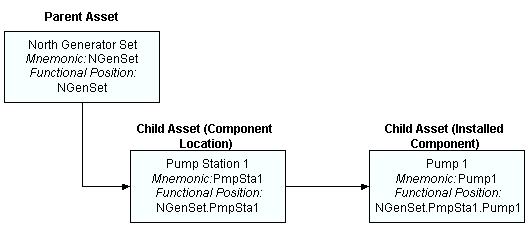
A hierarchy code is a string of up to 10 letters and numbers that identifies an individual asset. For the hierarchy location to be useful, enter a hierarchy code that gives users some indication of the asset’s function and location. For example, if a generator set is located on the north side of the plant, you might enter “NGenSet”. If the generator set has a pump location, you might enter “PumpSta1” on the component location record, and “Pump1” on the record for the pump component asset.
APM creates the hierarchy location string from the hierarchy codes of all the parent assets. Each hierarchy code is separated by a dot. APM does not go higher than the site level to construct the hierarchy location. The diagram below shows how the hierarchy location relates to an asset hierarchy.
The hierarchy location is most helpful with component assets that tend to be installed at a number of different component locations over time. The hierarchy location is automatically updated whenever the asset moves in the physical hierarchy. This provides an accurate and reliable indication of where the asset is located within the physical hierarchy.
You might experience performance problems if you make a large number of changes to the physical hierarchy or to the hierarchy codes of a large number of assets.

Physical Locations

When you create an asset record, you can use the Asset Location box to record the physical location of the asset within a facility or site. Two common ways of doing this are:
When you install a component asset in a component location, APM sets the component’s asset location to be the same as the component location. APM applies the new asset location to all of the children of the component. When you remove a component from a component location, you can enter the new location value for the component asset. APM assigns the new asset location to the component location and to the location of its children.
TOP