Asset Hierarchies

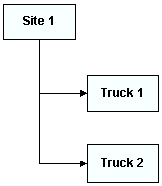
An asset hierarchy is a representation of how the assets in your organization are related to each other. The asset hierarchy is the foundation for your enterprise asset management and APM system. Asset hierarchies allow you to organize asset records so that you can find assets quickly, so that you can view asset work histories and costs, and so that you can easily maintain your asset management and APM system. Below is an example of a simple hierarchy:

Hierarchy Breakdown

A comprehensive asset hierarchy needs to be more than a simple list of assets. When you and your co-workers construct your hierarchy you should:
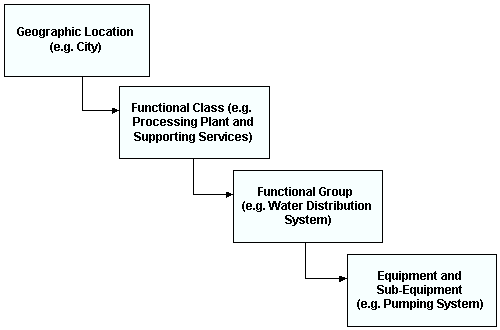
A comprehensive asset hierarchy can break down the organization’s assets by geographic location, functional class, functional group, equipment, and sub-equipment. How you construct your hierarchy depends on the needs of your organization. Your Bentley Systems implementation consultant can help you to determine the best structure for your hierarchy.
The following illustration shows a typical hierarchy breakdown:
TOP

Multiple Asset Hierarchies

When you enter assets, you can organize them in up to five different hierarchies. The first hierarchy is the comprehensive physical hierarchy (“physical hierarchy”). Most (if not all) of your assets should be included in this hierarchy. Ideally, the lowest level of your physical hierarchy is usually the level at which you write work orders, collect costs, and collect indicator data. Items lower than this level do not generally appear in the hierarchy, but you can include them in the parts list for an asset. Bentley Systems’s implementation consultants can help you to determine an appropriate structure for the physical hierarchy for your organization.

Alternate Asset Hierarchies

You can use the other four alternate hierarchies available in APM to make it easier for specific groups of people to view the assets that matter to them. You can set up hierarchies 2-5 differently from the first one if you want to track costs in a different way. During implementation, you will decide how many hierarchies to use. For example, your accounting department might assign costs by department. If departments are not included in the physical hierarchy, you might want to set up a financial asset hierarchy organized by departments in order to better analyze costs.
Alternate asset hierarchies 2-5 do not display locations and installed components the same way the first hierarchy does. You cannot “install” components into locations in alternate hierarchies. In the alternate hierarchies, if you want to include components you must add them directly into the hierarchy as children of other assets.
Each hierarchy must be maintained independently. If you remove a component from the physical hierarchy, it will still appear in the alternate hierarchies to which it was added.
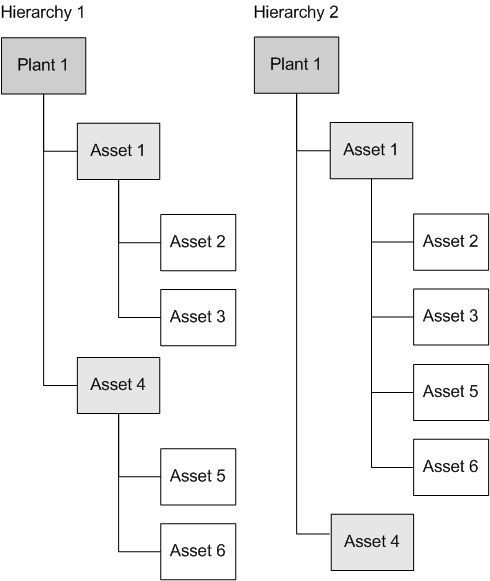
Costs independently “roll up” each alternate hierarchy based on its structure. Cost roll-up for the two example hierarchies shown in the following diagram are described next.
For example, in Hierarchy 1, asset 1 will show the costs for assets 2 and 3 only, while asset 4 will show the costs for assets 5 and 6 only. In Hierarchy 2, asset 1 shows the costs for assets 2, 3, 5, and 6, while asset 4 shows only its own costs.
If both the component and location are in an alternate hierarchy, only the component shows the costs. The costs collected on that asset are also shown on that component’s alternate hierarchy parent. The reverse is also true: costs charged to a location in the physical hierarchy are not shown on the installed component in alternate hierarchies.
TOP

Hierarchy Representation

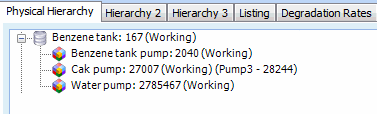
The hierarchies you create in APM are represented graphically on the Assets view in the Site window, as shown below.
Installed components are shown with the component’s location in the hierarchy. The component location is shown first, and both the asset status and installed component are shown in brackets beside the location. For example, in the window shown here, Cak pump 27007 has an installed component called Pump3 - 28244.
TOP