Asset Downtime

Asset downtime occurs when an asset is not in a condition to perform its intended function. With APM’s Downtime feature, you can record after-the-fact downtime incidents and related statistical information. It is not intended for planning or scheduling downtime.
Downtime incidents are tracked from the moment the asset fails until the moment it is fully operational again. You can track the duration of the downtime incident, the scheduled and unscheduled downtime, the reason for the downtime, the asset’s operating level percentage, the costs for lost production, and the work order task associated with the repair.
You can define by asset type whether to allow or disallow downtime costs to be calculated or reported. Downtime costs can be defined for the current asset or from one of its ancestor assets within the same site. Typically, downtime incidents are tracked for major pieces of equipment or assemblies and are not usually recorded for components or sub-components.
Downtime incidents are usually created when you are reporting activity for work order tasks. You can create one or more downtime incidents for each task. In addition, you can create “ad-hoc” downtime incidents that do not reference any work order. You can also track downtime incidents on failure records.

Downtime Incident Durations

Three downtime durations are recorded on each downtime incident: the production-affected duration, the scheduled downtime duration, and the unscheduled downtime duration. The production-affected duration is used to calculate the total downtime costs for the incident. The scheduled and unscheduled durations add up to the production-affected duration.
In addition to the downtime durations, the total elapsed time of the incident is calculated, equal to the difference between the downtime’s start and end times. In most cases, the elapsed time and production-affected duration are the same.
In certain situations, the production-affected duration can be less than the total elapsed time. Two examples of when this can happen are:
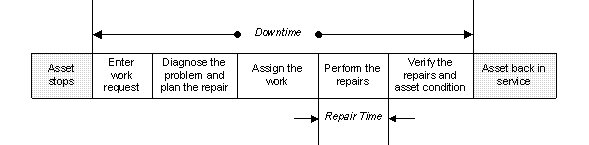
The downtime duration is usually much longer than the repair time, as shown below.
TOP

Examples of Calculating Downtime Durations

1.
The fact that the equipment was made available to maintenance an hour late does not affect the downtime durations. The asset was still down for only four hours. The hour while the maintenance was waiting for the equipment would be accounted for as a delay on the tradespersons’ timecards.
2.
3.
TOP

Downtime Reasons

Before you start to use APM’s downtime incident functions, define a list of reasons for downtime. In this way, you can track downtime by specific causes. The reasons for downtime can be used to classify the downtime as being for repairs, inspection and production stoppage, and so on.
You might want to define a reason called “other” to cover downtime incidents that do not fall into one of the reasons you have identified. But you should monitor its use to determine if additional reasons should be added to the list.
The list of reasons can be used for downtime incidents, work delays, and failures, work delays and failures only, or downtime incidents only. For example, the reason “Incorrect Parts” might be used for work delays and failures, as well as downtime incidents.
TOP

Asset Operating Percentage During Downtime

Not all downtime incidents result in the asset being completely down. An operating percentage is recorded to identify the impact of the downtime on the asset’s ability to function. For example, a percentage of 0% indicates that the asset is completely down. A percentage of 50% indicates that the asset is able to function at 50% of its intended capacity.
TOP

Downtime Costs

Costs for downtime incidents can be tracked in terms of monetary value, lost production time, and lost production units. For example, a downtime incident results in three hours of lost production. This equates to a loss of 3,000 units with a value of $15,000.
When you define an asset’s downtime cost, you identify the monetary and production unit cost for the asset for a unit of time. For example, the downtime cost for the asset used in the previous example would be 1,000 units per hour at a cost of $5,000 per hour. You can define an asset’s downtime cost as production units, a monetary cost, or both.
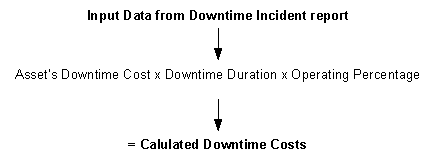
The cost of a downtime incident is calculated by multiplying the asset’s downtime cost by the downtime duration by the operating percentage reported on the downtime incident, as shown below.

Setting up Production Loss Rules on Assets

You can set up the production loss rules on an asset to calculate the monetary and production impact of downtime.
The current asset’s rules can be used to calculate costs, or the costs can be defined from an ancestor asset. If you decide to use downtime values from an ancestor asset, APM looks up the hierarchy within the current site for the first ancestor asset with downtime defined on it to calculate costs.
Production loss costs can be calculated as the lost production units, a monetary value, or both.
Lost production units: This is the number of units that are not produced while the asset is down. For example, 10 tons.
Monetary costs: This is the lost monetary opportunity. For example, $5,000.
Duration for costs: This is the period of time that the number of lost production units and lost monetary value are based on, for example, 8 hours.
Using these examples, the asset’s production loss costs are 10 tons per 8 hours and $5,000 per 8 hours.
In some cases, you might decide not to calculate costs for downtime incidents, but you still want to record incidents. For example, there might be no lost production costs if a system is built for backup or if the downtime is so variable (the actual cost depends on the specific product that is being produced) that providing a standard cost makes no sense.
You can define two or more production loss equations for an asset to cover different intervals, for example, the first hour of downtime and the subsequent hours. The calculation can also take into account a reduction in production percentage when a full shutdown is not in effect.
A production loss cost equation can record the sequence and duration of the interval, the downtime cost per unit of time, and lost production cost per unit of time. You can select a default equation to be used for the asset.
Production loss equations are available on the asset’s production loss accounting properties, downtime incidents, and failure mode risk analyses in strategy development analyses.

Setting up Asset Types to Track Downtime

You can specify by asset type whether to allow or disallow production loss accounting rules. If the asset type is set up so that production loss rules are allowed, when you create a new asset of this type, you can enter production loss rules.
If the asset type is set up so that production loss accounting rules are not allowed, you cannot define production loss accounting rules on assets of this type (the Production Loss Accounting tab in the Asset Properties view is not available).
You can also identify by asset type whether or not downtime incidents can be recorded. Again, you have two options: either the downtime incidents can be reported against the assets or they cannot.
TOP

Viewing Asset Downtime

You can view asset downtime from the site’s Performance Management view, Failures and Downtime tab, Downtime tab, or an asset’s Performance Management view, Downtime tab. You can also view downtime associated with a failure on the failure’s Downtime tab.

Viewing Production Loss Summaries

You can view a site’s lost production summaries by product, reason, and production asset for the current month, from the Performance Management view, Production Loss Accounting tab, Lost Production tab. In addition, on the Bad Actors tab you can view different configurations of incidents grouped by the “bad actor” assets that contributed to the production loss.