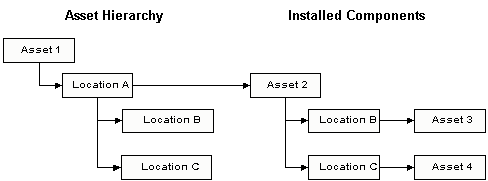
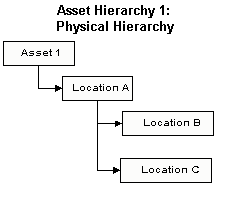
You can create the physical hierarchy in the site’s Assets view. Simply add your asset to the hierarchy and then add the component locations as children in the hierarchy. Components and parallel component locations do not appear in the physical hierarchy, which is depicted below. Instead, you can see a component’s locations by opening it to the
Hierarchies view. You can see the components that are installed in a particular location by opening the location and noting the Installed Component listed on the
Component Location tab of the
Properties view. You cannot see the parallel hierarchies at the same time. Costs charged to installed components are also charged to the component location, enabling them to roll up the physical hierarchy.
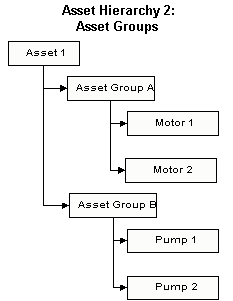
When you work with assemblies, it is a good idea to use one of the five asset hierarchies to record asset groups and components and to allow costs to be posted to this hierarchy. An example of this hierarchy is shown below. When you write work orders for components that are not installed in any location, the component is also the asset to charge. Since components do not appear in the physical hierarchy, the costs would not be recorded there. Instead, they would appear in the asset group hierarchy. When you write work orders for installed components and both the component and the component location collect the charges, APM ensures that the cost is added only once when the costs roll up to the top asset in the hierarchies.
You can choose to use a component location, an installed component, or an uninstalled component as the asset to work on and as the asset to charge. Work history is saved on the asset to work on. Costs are stored on the asset to charge and rolled up that asset’s hierarchy. The hierarchy or hierarchies that you use to collect costs should be organized with the following restrictions in mind: only organizational or group assets can be parents of components, and components cannot be parents of component locations. Because the physical hierarchy records all of your component locations, you can record costs assigned to component locations on that hierarchy.
On the other hand, if every motor needs to be lubricated regularly regardless of where it is installed or even whether or not it is installed anywhere, you would create a standard job on the motor. When the component is installed in a location, the work order will show the component as the asset to work on and as the asset to charge. Work history and costs will be stored on the installed component, the component location, and the parallel component location, if one exists. Again, if components and component locations are organized on two asset hierarchies that both collect costs, APM will ensure that the cost for each work order is added only once to the top asset.
If every motor needs to be lubricated periodically even when it is not installed in any location, you need to be able to write work orders for uninstalled components. You can write work orders with an uninstalled component as the asset to work on. Work history will appear only on the component. The component is also the asset to charge by default, and the previous location will not record the charges for the work. If you want to charge the previous location with the costs of the work, you can select it as the asset to charge. The costs will be recorded only on that location. Neither the asset to work on nor the location's current installed component will be charged with the costs.