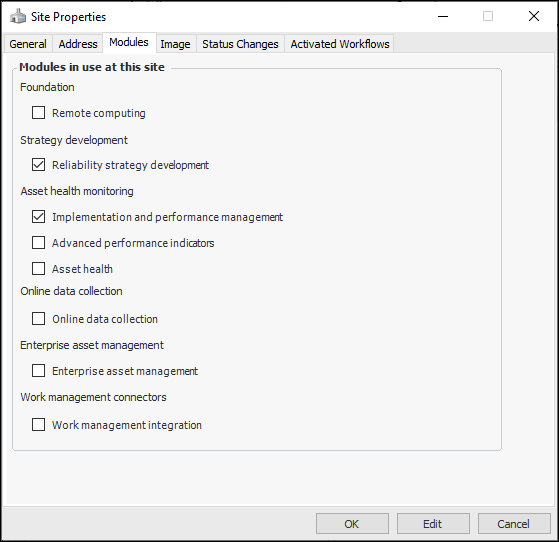
Tasks Enabling and Disabling Application Modules on Sites Each APM product has one or more modules. You can enable (and disable) modules for individual sites. This allows you to control what users see on a site. For example, a customer might have these modules to work with: Reliability Strategy Development, Implementation and Performance Management, Advanced Performance Indicators, and Asset Health. One of the customer’s sites is only starting their implementation, and they wish to begin by performing Strategy Development analysis of key assets. The other modules can be turned off for this site, thereby keeping the look and feel of APM appropriate for users. When ready, the other modules can be turned on for the site. If you have licensed the Enterprise Asset Management (EAM) module, you can turn it off on individual sites. In a site hierarchy that contains both EAM and non-EAM sites in the same branches, if you are using a central Purchasing site at a higher level, create different site types for EAM and non-EAM sites with different object ownership rules. The non-EAM site type should not include permission to own purchasing objects (purchase orders, RFQs, invoices, contracts, suppliers, and supplier resources). This will prevent purchase orders, for example, from being created at sites that do not support them. Note: When you add a new site to the enterprise, only the Reliability Strategy Development module is enabled. Note: The Help invoked from a Site window displays information about EAM functionality only if the EAM module is enabled for that site. For the Enterprise window, the version of Help that appears depends on whether or not the EAM module is enabled for the top site. To Enable or Disable Application Modules on a Site 1. Open the site window. 2. Click the Site menu and then Properties. The Site Properties window appears. 3. Select the Modules tab. For example: This tab lists the APM products and shows their statuses. 4. Click the application modules that you wish to enable or disable on the site. You will notice dependencies between modules, for example, Implementation and Performance Management is a prerequisite for: • Remote Computing • Advanced Performance Indicators • Online Data Collection • Work Management Integration Note: If you enable Enterprise Asset Management and wish to use indicators or failure tracking, enable Implementation and Performance Management as well. 5. Click OK. The change takes place immediately.