Setting up Substitute Approvers

In APM, approver substitutions are used when an approver wants to delegate approval responsibilities to a stand-in approver for a period of time. Substitutes are usually appointed when an approver is going to be unavailable for an extended period, such as during a vacation. The original approver’s approval limit is used.
A substitute approver can be identified in one of two ways. The next approver on an approval route can be named as a substitute. Then, all new approval requests skip the original approver and move to the next approver on the route, unless all other approvers in the route have responded. The other way to identify a substitute approver is to assign a specific employee as the substitute. Different substitutes can be named for each approval route.
While the substitution is in effect, any requests that would normally be sent to an approver are routed to the substitute. Substitutions are in effect for the specified period of time or until the original approver cancels the substitution.

To Create a Substitute Approver

1.
Select the site’s Personnel view, the Employees tab, and then the Listing tab.
2.
3.
4.
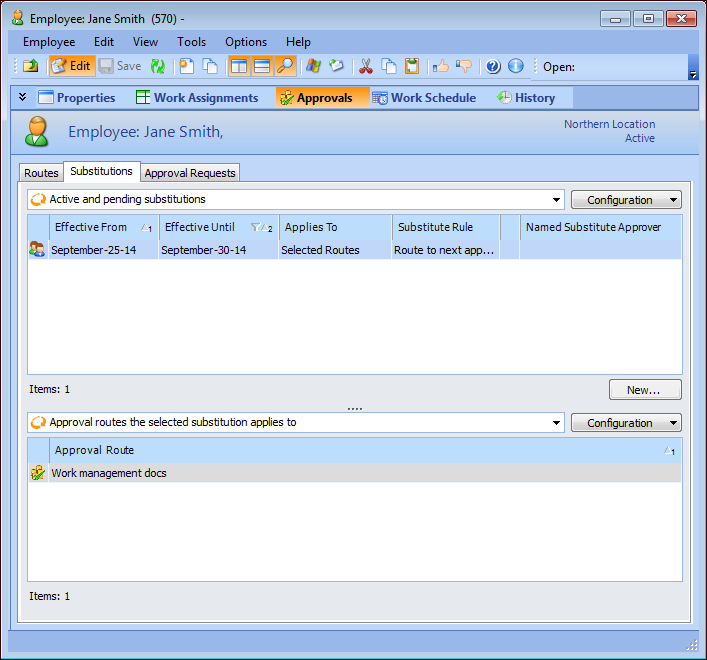
Select the Approvals view, Substitutions tab. The top list shows the active and pending substitutions for the employee. The bottom list shows the approval routes to which a substitution applies.
5.
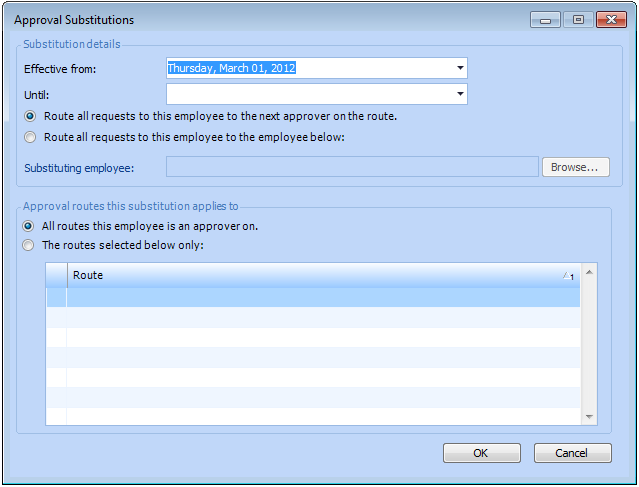
Click New to create a substitution. The Approval Substitutions dialog appears.
6.
7.
If a specific employee is the substitute, then select Route all requests to this employee to the employee below and click Browse to select an employee name.
Note: Only employees defined at the same site or a higher-level site can be selected as substitute approvers. Only employees authorized to approve the types of documents approved by the route can be selected. For example, if the approval route is used to approve purchase orders, work orders, and asset transfers, only employees authorized to approve all of these documents are included in the list of possible substitutes.
8.
9.
Click OK to save the substitution.
10.