Setting up an Employee as an Approver

Approvers in APM have the authority to approve or reject documents that are sent to them for approval using an approval route. Approvers have maximum approval limits for each approval route they are on. You can specify that an approver must review all requests.
When you set up an approval route, you will identify the approvers who will review the documents sent to the route. You can specify the maximum value these employees are authorized to approve.
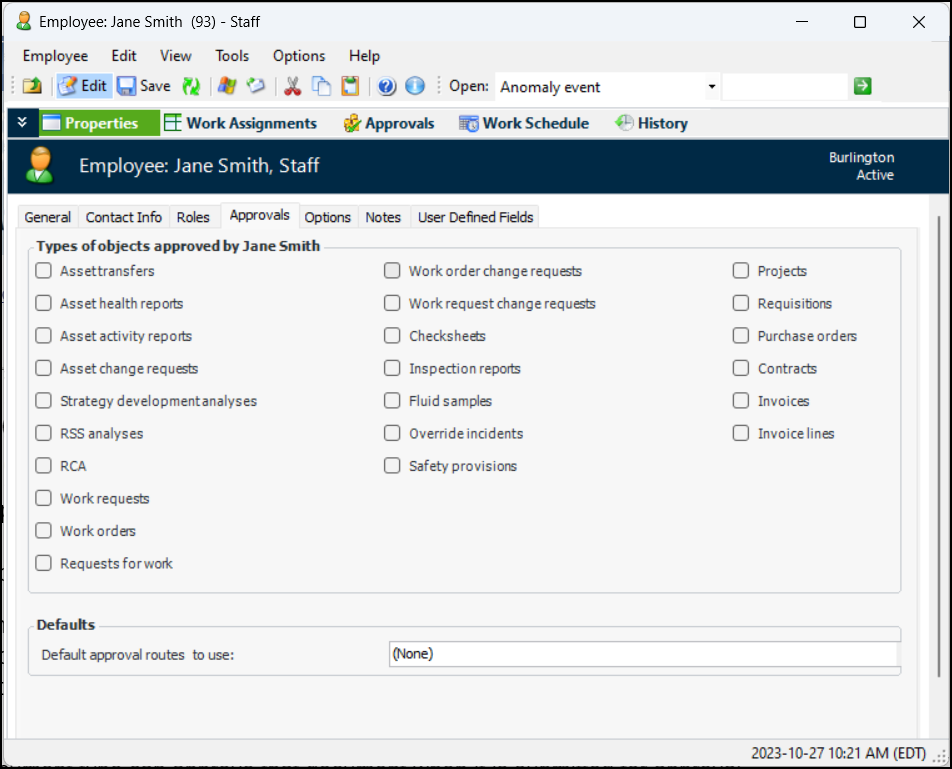
Only employees set up in APM as approvers with the authority to approve a specific document type can approve that document when it is submitted for approval.
In addition, if an employee cannot approve a document type that is included on an approval route, that employee cannot be added to the route as an approver. For example, only employees with authority to approve work orders can be included on a work order approval route. Approvers can be assigned authority to approve any combination of document types.
This topic explains how to give approval authority to an employee.

To Set up an Employee as an Approver

1.
From the site’s Personnel view, select the Employees tab, and then the Listing tab.
2.
3.
4.
From the Properties view, select the Approvals tab.
5.
6.
7.
 
8.
9.
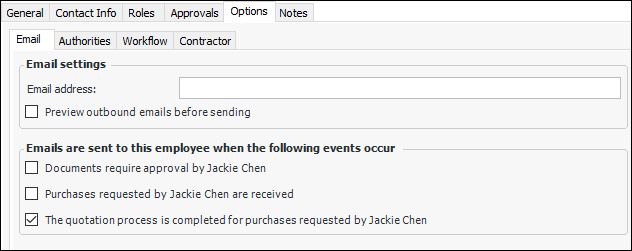
Select Documents require approval by [employee name].
10.
Optionally, you can select Purchases requested by [employee name] are received, and/or The quotation process is completed for purchases [employee name] requested.
11.
You can now add the employee to one or more approval routes. See Adding Approvers to an Approval Route.
Note: The approval limit is set for employees when they are added to approval routes.