
|
Bypassing Another Approver on an Approval Route
Any employee identified as an approver on the same approval route and who has a higher approval limit than the absent employee can approve the request. The absent employee and any approvers between the absent employee and the actual approver are pre-empted by this approval.To Bypass Other Approvers on an Approval Route
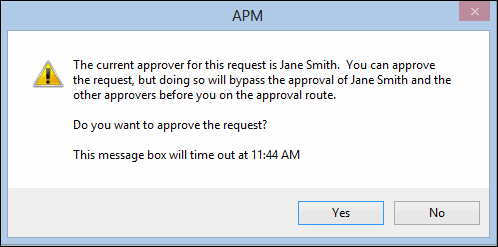
2.
4. Click Yes. The Approve or Reject dialog appears.
• To approve the request(s), click Approve. In the Comments box, you can type a note to the requestor or next approver.
• To return the request(s) without approval, click Reject. In the Comments box, you can type a note to the requestor or next approver.
• To forward the request(s), click Forward to. Select the employee to send the request to. If you wish to forward the request to ask another employee for input or to clarify some information about the request, select Return the request to me after this person acts on it. If you wish to forward the request to ask another employee to approve the request, select Do not return the request to me. This person is acting on my behalf.
6. Click OK. The approval request is updated.