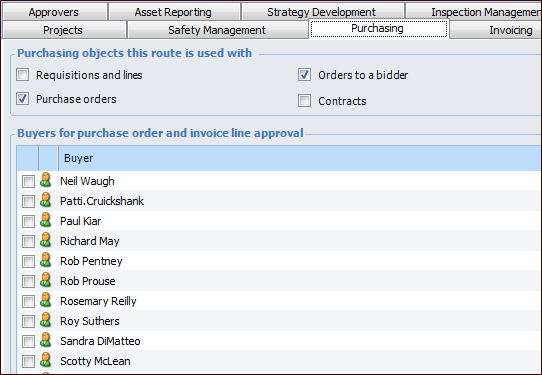
Concepts Tasks Settings Limiting Approval Routes to Specific Buyers By default, all buyers are available for an approval route when that route is created. However, if a route is used to approve purchase orders, contracts, or invoice lines, you can restrict the route to a specific buyer or buyers. Adding a buyer to an approval route means that only purchase orders, contracts, or invoice lines that are the responsibility of that buyer can be sent to the route. Objects assigned to other buyers cannot be sent to the route. When you send a purchase order, contract, or invoice line for approval, the system filters the list of available approval routes so that only appropriate routes can be selected. For purchase orders and invoice lines, the system can be set to choose routes based on either the buyer responsible or on the GL account being charged. If the site has been set up for approvals based on the GL account, selecting buyers on the approval route does not affect the route selected by the system. In other words, if the site is using GL account approval routing for purchase orders and invoice lines, selecting buyers on an approval route only affects route selection for contracts. This topic explains how to select buyers for an approval route. To Limit an Approval Route to Specific Buyers 1. In the Approval Route window, select the Purchasing or Invoicing tab. For example: 2. Select each buyer that you want to add to the route. If you do not select any buyers, the route is available to approve requests for all buyers. Note: You can add the same buyer to multiple approval routes. 3. Save the approval route.