|
Adding Trades to a Task Template
You can specify which trades are required to do the work, how many employees or contractors are required for each trade, and the number of hours they are required for.You can apply changes that you make to the task template to the standard tasks that are based on it. Changes are applied to each standard task unless the requirement has been overridden. For more information about applying changes, see Editing a Task Template.This section explains how to add labor requirements (trades) to a task template. For information about entering general planning information, see Entering Planning Information for a Task Template.To Add Trade Requirements to a Task Template
3. On the Properties view, select the Planning tab. This tab shows the planning information for the task, as well as a list of trades, materials, tools, and services currently selected for the task.Note: By default, APM calculates the estimated duration of the task based on the time requirements for labor, tools, and time-based service requirements. To provide the estimated duration manually, clear the Calculate options and enter the value in the Estimated duration boxes.
4. Tip: To quickly add one or more trades and specify their time requirements, click Browse on the Labor tab. The Browse Catalog dialog appears, where you can specify the time for each trade and click OK.
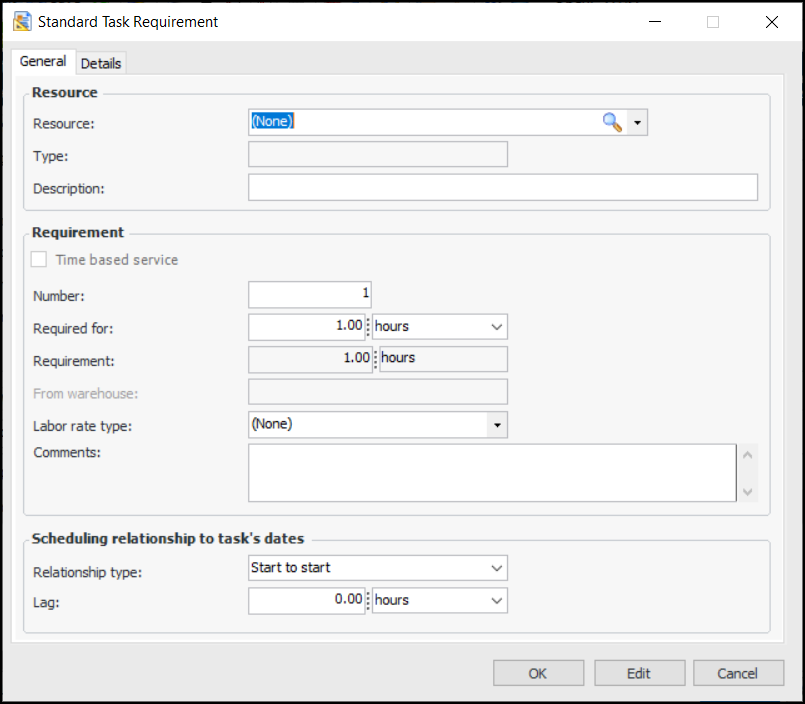
The total number of items that are required. For example, the number of employees or contractors required for the trade or the number of tools.
The amount of time that each employee, contractor, tool, or service person is required. For example if you are entering a trade requirement, enter how long each employee will need to work on this task. The total time entered for the requirement will be calculated as:Number Of x Required For
• Start to start (SS): The requirement starts when the task is planned to start, offset by any entered lag time.
• Finish to finish (FF): The requirement ends when the task is planned to end. The system automatically calculates the required lag time.
This setting is used when calculating the estimated duration of the task, and when the task is scheduled.