Adding Hints to a Table Configuration

Database administrators (DBAs) needing to improve performance might want to use hints. Adding hints to the database can improve the performance of some tables (MCLBs). This feature should be tested, enabled, and monitored to ensure query performance.
Note: For SQL Server databases, only query hints are allowed (hints that are appended to the end of an SQL statement). APM does not support table hints or join hints in SQL Server databases. For more information on using hints with SQL Server, see the SQL Server Books online help file.
You can add hints to any table configuration in APM. To add hints, you must launch the application as an APM administrator.
Note: Table configuration hints are not copied when the table configuration is copied.
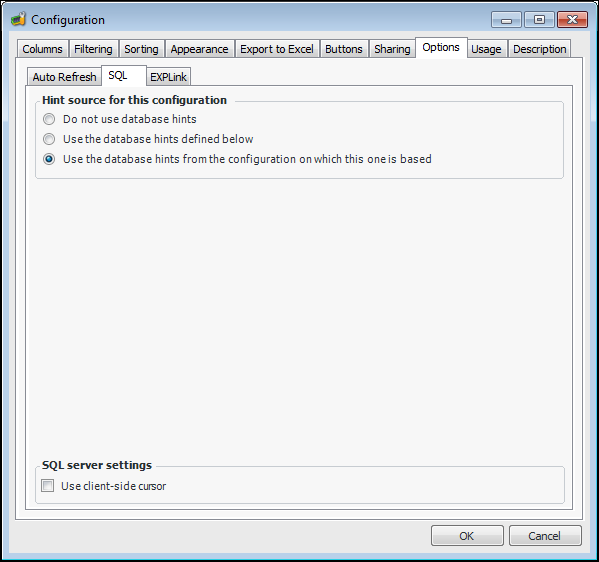
You cannot add hints to APM type configurations. However, you can override the APM configurations by creating Customer configurations (with an Administrator license). If you choose to override a configuration, you can set the new configuration to:
For information on the types of hints available and their syntax, see either your MS-SLQ Server or Oracle documentation.
Note: There is no syntax or semantic checking on the hint strings. Badly structured hints will be ignored. If a bad hint is entered the system will re-try the slice without the hint. In an SQL Server database, if a slice fails with a hint but succeeds without one the system will display a message explaining that the hint is being ignored. However, for Oracle users the system will not display a message. The syntax for oracle hints puts the hint inside a comment (e.g. /* +ALL_ROWS */). If the hint inside the comment is bad it will be treated as a comment and ignored, but no message will be posted.

To Add Hints to a Configuration

1.
2.
In the Configuration list click Open. The Configuration dialog appears, open to the Columns tab.
3.
Select the Options tab and then the SQL tab.
Note: If you do not see this tab, you are not logged in as an APM administrator.
4.
In the Hint Source section, select the option Use the database hints defined below.
5.
Enter your hints in either the SQL Server or Oracle section, as appropriate.
6.
Warning: The Use client-side cursor option should only be used in advanced situations and can cause serious implications if used incorrectly. Contact APM Support for more information.