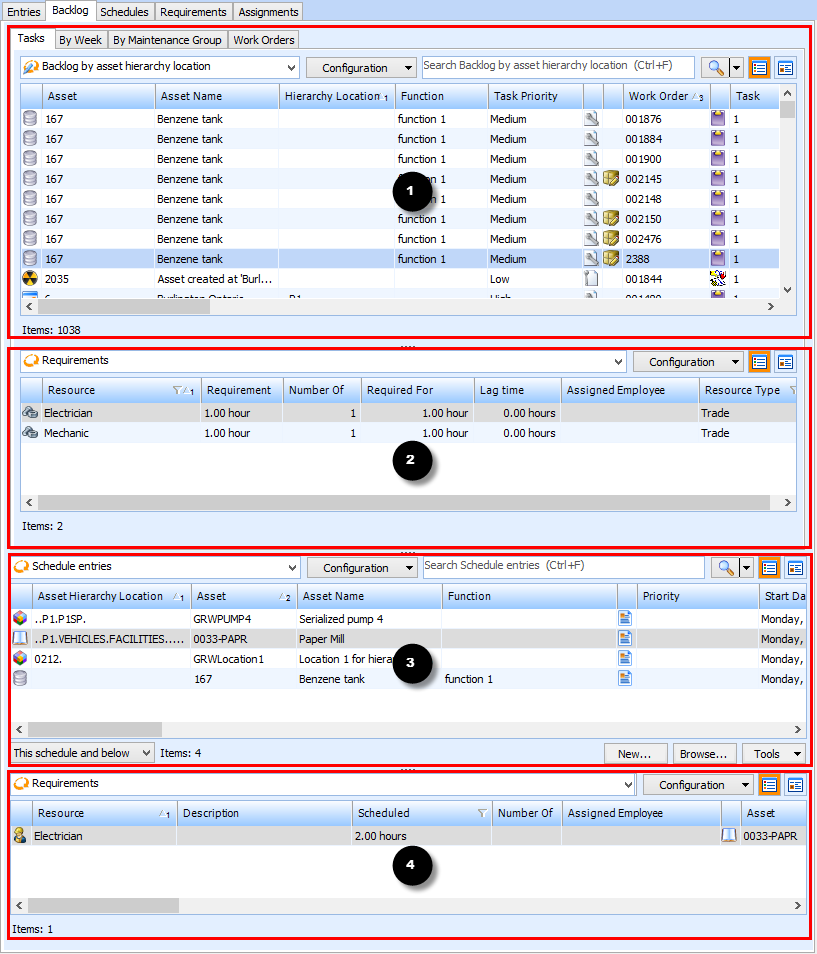
Concepts Tasks Settings Adding a Task from the Work Backlog You can make availability schedule entries using tasks that are in your work backlog. These are tasks that have been planned but not yet scheduled. If there are already timecard entries for the task (the work for the task has been started), APM uses the estimated time remaining entries on the timecards to create the schedule entry. To Add a Task to a Schedule from the Work Backlog 1. Open the schedule. 2. On the Worksheet view, select the Backlog tab, and then the Tasks tab. Four tables appear: • A list of backlog tasks that are ready to be scheduled. ( ) • Requirements for the selected backlog task. Only tasks for the schedule's maintenance groups are included in the list. ( ) • Scheduled task entries that are currently on the schedule. ( ) • A list of Requirements for the selected schedule entry task. ( ) Tip: You can filter and sort the list of work order tasks, to quickly find a task in the backlog. 3. You can drag and drop a backlog task from the backlog table ( ), onto the scheduled entries table ( ), to move a task from backlog into the schedule.



 )
) )
) )
) )
)