Setting up Site Integration Between APM and CMMS Instances

APM and AWEIS support the integration of two or more instances of a CMMS (such as SAP Plant Maintenance) with sites in a single APM database. For example, a facility, factory, or plant in SAP could exchange data with its corresponding site in APM. To support the integration, you can maintain site-specific value lists in APM along with site type settings that control which sites own employees and trade resources. Two elements are essential to the integration: InfoSource objects and AWInteroperabilitySystems.
Each CMMS instance is represented in MIMOSA by an InfoSource object. Each InfoSource has a UUID that uniquely identifies the CMMS. The XML messages exchanged with the CMMS include the InfoSource UUID, which allows AWEIS to manage data that is owned by that CMMS.
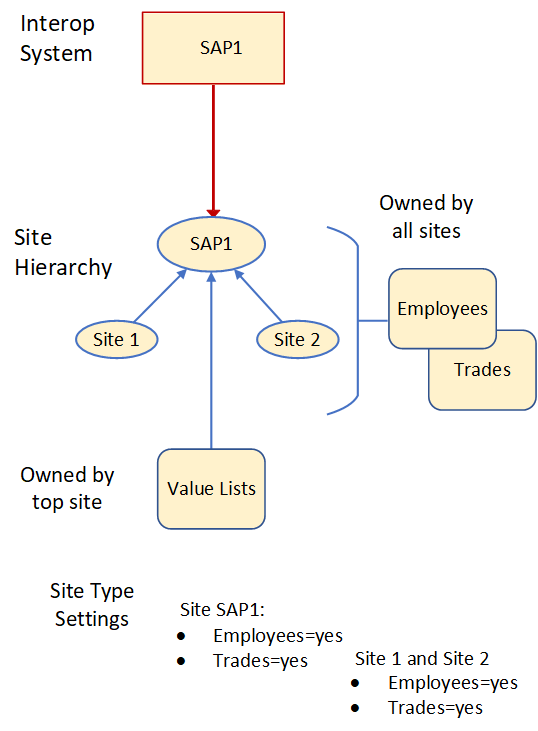
In APM, an InfoSource is represented by an AWInteroperabilitySystem object, which has the same UUID as the InfoSource in the XML messages. APM is configured so that each AWInteroperabilitySystem is linked to a root site that owns all of the value lists associated with that InfoSource.

Value Lists, Employees, and Trades

The supported AWEIS and APM value list classes include:
Employees and trades in APM have similar semantics as the other value lists but with some differences in behavior.

Typical Configurations

There are a number of ways that the InfoSource and site type rules can be configured, depending on the organization’s requirements. This section illustrates some common approaches.

CMMS Instances in the Example Scenarios

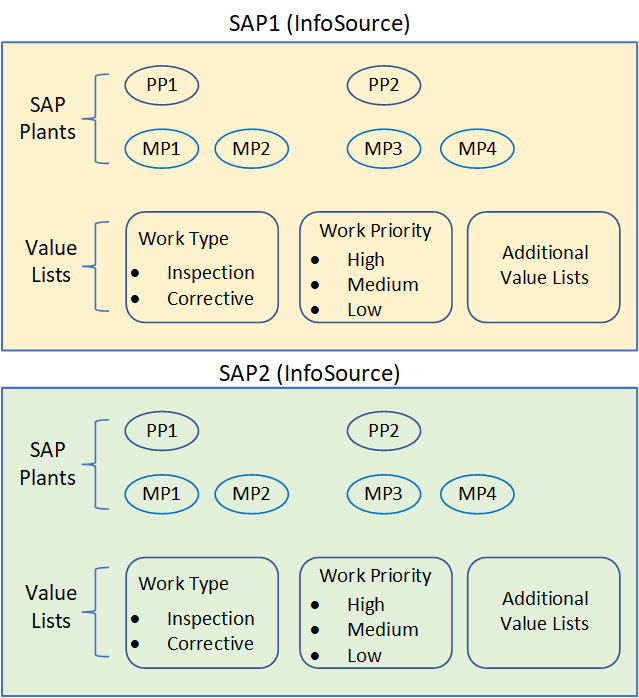
Each CMMS instance (SAP1 and SAP2) has its own plants and value lists, as shown below.
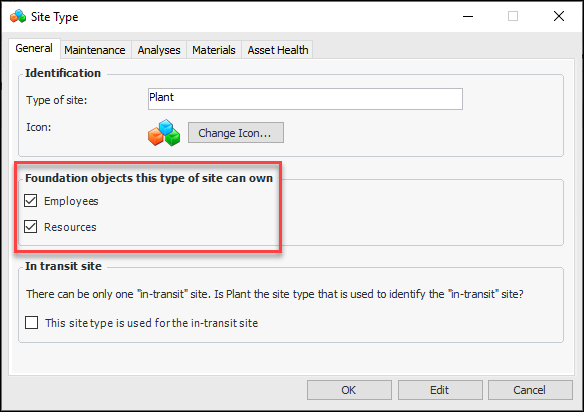
In APM, a root site is created for each CMMS instance. Each root site has its own AssetWise Interoperability system and InfoSource (and UUID). Site types have also been set up with the appropriate employee and resource ownership settings.

Scenario 1: CMMS Sites Own Value Lists, Employees, Trades

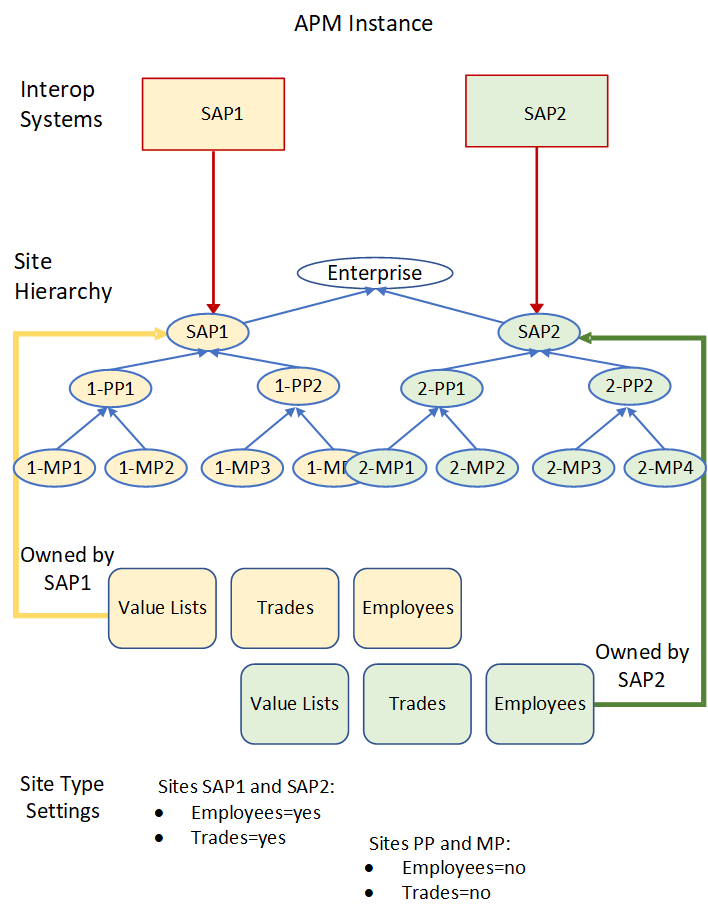
In this scenario, all of the value lists, employees, and trades are owned at the root site linked to the CMMS InfoSource.
The site types for child sites are configured to not allow the creation of employees and trades. If a SyncLogisticsResource or SyncAgent message is received with a RegistrationSite that references a child site, an error will occur.

Scenario 2: Child Sites Own Employees and Trades

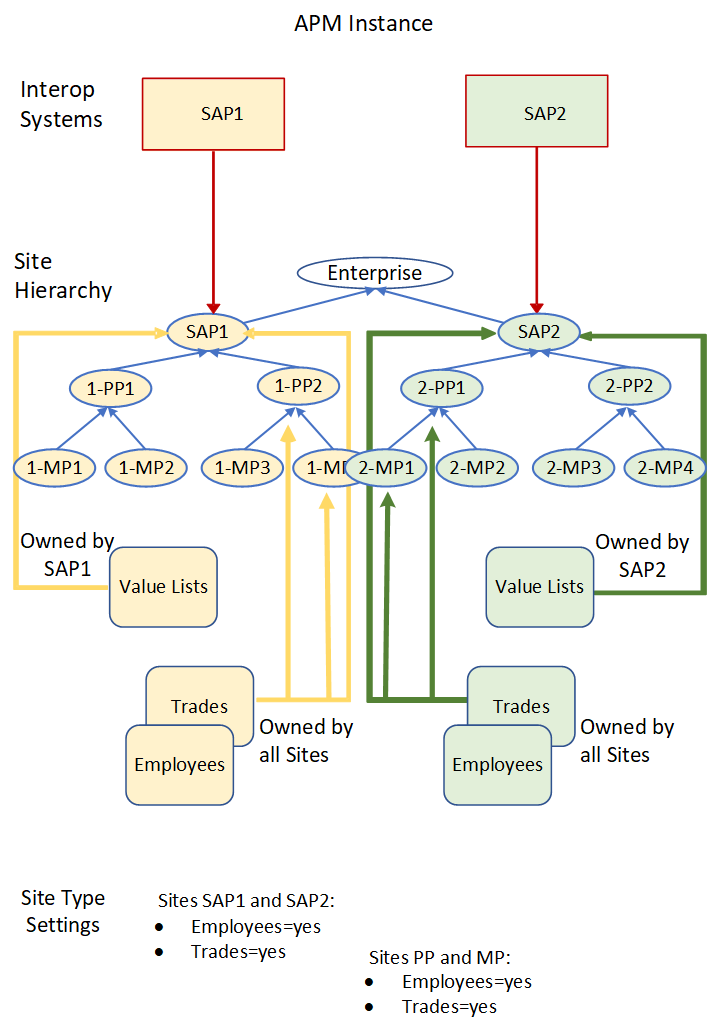
In this scenario, the value lists are still owned at the root site, but the employees and trades are owned by the child sites. When a trade or employee is created through a SyncWorkRequest or SyncWorkOrder, it is placed at the same site as the corresponding interop work request or interop work order.
The SyncLogisticsResource or SyncAgent method can include the optional RegistrationSite, or employees and trades can be created at the root site by default.

Scenario 3: Single CMMS Site Owns Employees and Trades

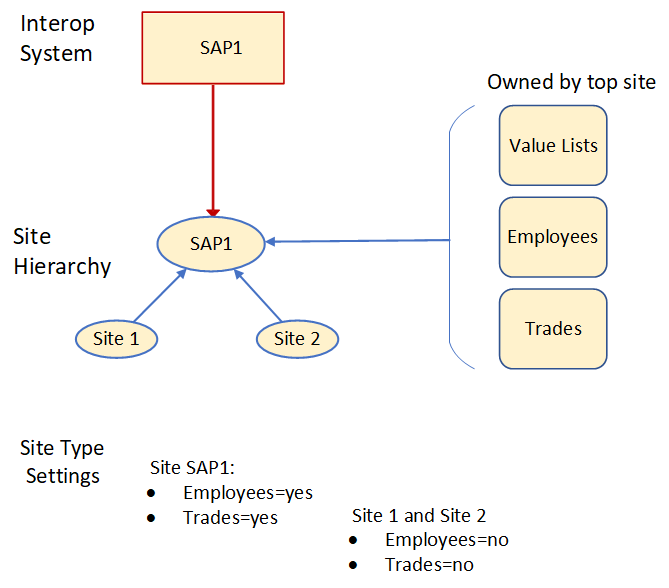
Even though this is a single CMMS scenario, it is still necessary to configure a matching AWInteroperabilitySystem in APM and link it to a site. In a single CMMS scenario, the top site would normally be used to own the value lists for the CMMS.
In this scenario, all value lists, trades, and employees are owned by the top site. Any SyncLogisticsResources or SyncAgents messages should either not include the RegistrationSite or should make sure that it references the top site.

Scenario 4: Single CMMS – Child Sites Own Employees and Trades

Even though this is a single CMMS scenario, it is still necessary to configure a matching AWInteroperabilitySystem in APM and link it to a site. In a single CMMS scenario, the top site would normally be used to own the value lists for the CMMS.
In this scenario, trades and employees can be owned by child sites. When a trade or employee is created through a SyncWorkRequest or SyncWorkOrder, it is placed at the same site as the corresponding interop work request or interop work order. Any SyncLogisticsResources or SyncAgents messages can either include a RegistrationSite or it will default to the top site.

Setting up Site Integration with APM and AWEIS

This section provides an overview of the steps required to integrate CMMS instances with APM sites. Note that these steps are required even for a single CMMS site integration.
Note: In previous versions of AWEIS and APM, an AssetWise Interoperability System was required to represent APM. As of APM version 7.12.4 and AWEIS version 1.2.4.0, this is no longer required and can be removed.
1.
For more information, see Setting up a Site Hierarchy.
Note: When your integration includes two or more APM sites exchanging data with CMMS instances, be sure to activate interoperability on the parent APM site, as well as its child sites. See Activating AssetWise Enterprise Interoperability in APM.
2.
For more information, see Setting up AssetWise Interoperability Systems.
3.
{
"Name": "APM REST API",
"InstanceType": "Bentley.Interoperability.APM.APMRestAPI",
"InstanceState": {
"BaseUrl": https://xxxxxxxx/xxxxxx/rest/,
"APIKey": "apikey xxxxxxxxxxxxxxxxxxxxxxxxxxxxxx",
"SenderLogicalID": "AssetWise",
"SenderComponentID": "APM",
"InfoSourceShortName": "APMxxx",
"RestTimeoutSeconds": 300
}
}
where, InfoSourceShortName is the user-visible unique identifier of the APM system, for example, “APMDev”.
Note that InfoSourceUUID is intentionally excluded from the configuration. When the dependency is created and started, an InfoSource UUID will be added with a randomly generated UUID. Here is an example:
{
"Name": "APM REST API",
"InstanceType": "Bentley.Interoperability.APM.APMRestAPI",
"InstanceState": {
"BaseUrl": "https://xxxxxxxx/xxxxxx/rest/",
"APIKey": "apikey xxxxxxxxxxxxxxxxxxxxxxxxxxxxxx",
"SenderLogicalID": "AssetWise",
"SenderComponentID": "APM",
"InfoSourceShortName": "APMxxx",
"InfoSourceUUID": "XXXXXXXX-XXXX-XXXX-XXXX-XXXXXX",
"RestTimeoutSeconds": 300
}
}
Note: The middleware must then be configured to use the InfoSource UUIDs for the CMMS instances and APM. Consult your Services team about configuring custom or BECS middleware.
4.
Assign the site types to the appropriate sites.
For more information, see **Setting up Site Types.
5.
Tip: This step is optional. AWEIS will always use the InfoSource mapping to the site to add new values.
For more information, see Setting up Site Value Lists.
6.
This setting is located in the Site Interoperability Profile window, Work Management tab, Requests tab. For more information, see Setting up Site Interoperability Profiles for AWEIS.
7.
If you are using a single CMMS, the script needs to be edited to include the InfoSource UUID. This will only populate sites and UOMs. All other data must come through the interface or through a custom script developed by the Services team.
For more information, see AssetWise Enterprise Interoperability Server Setup Guide.

Using APM Editing Rules

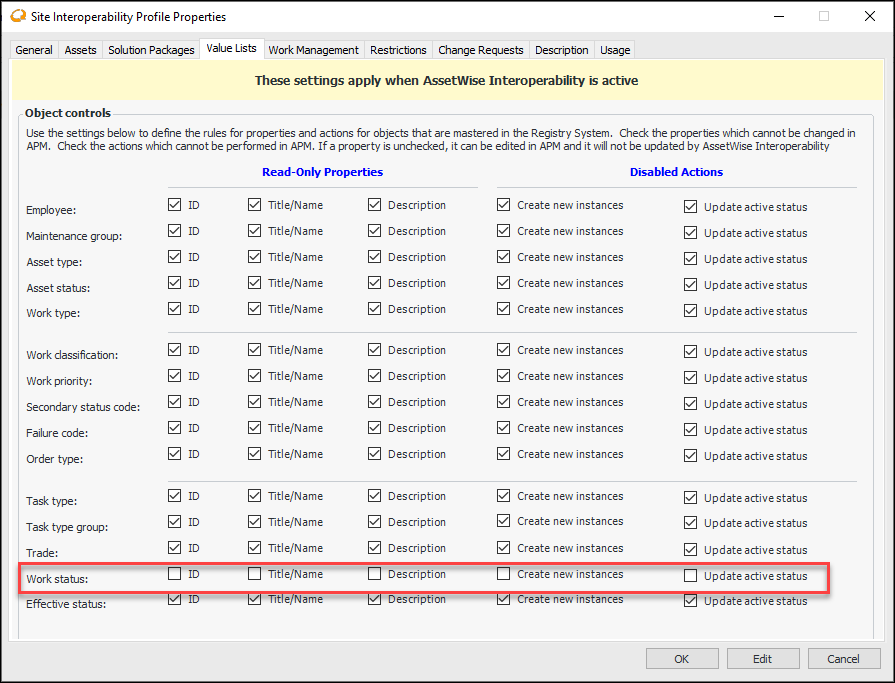
Normally, when AWEIS creates or updates APM objects, all of the mapped data is used to both create and update the object. However, there are situations where this might not be desirable. Consider the situation where a particular CMMS does not have data that is typically mapped in APM. One example might be WorkStatus. In that situation, you might want to “master” the missing the data in APM.
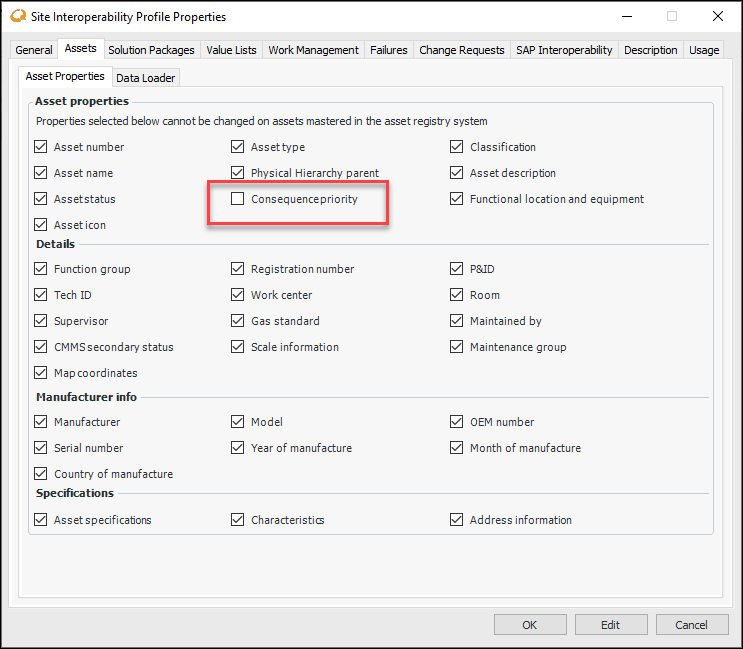
The site’s interoperability profile provides a mechanism to accomplish this. On the Site Interoperability Profile Properties dialog, the Assets tab allows you to specify which properties can be edited in APM. By default, all of the values are selected, which means that the attributes are controlled through the integration. If an item is not selected, the data can be edited in APM. This also changes the AWEIS behavior. When creating an object, AWEIS sets the value based on the input message, but when updating an existing object, AWEIS ignores that attribute or property.
The example below allows users to maintain an asset’s consequence priority in APM without it being updated from AWEIS.
In the Site Interoperability Profile dialog, the Value Lists tab allows you to specify which actions and properties are available in APM.
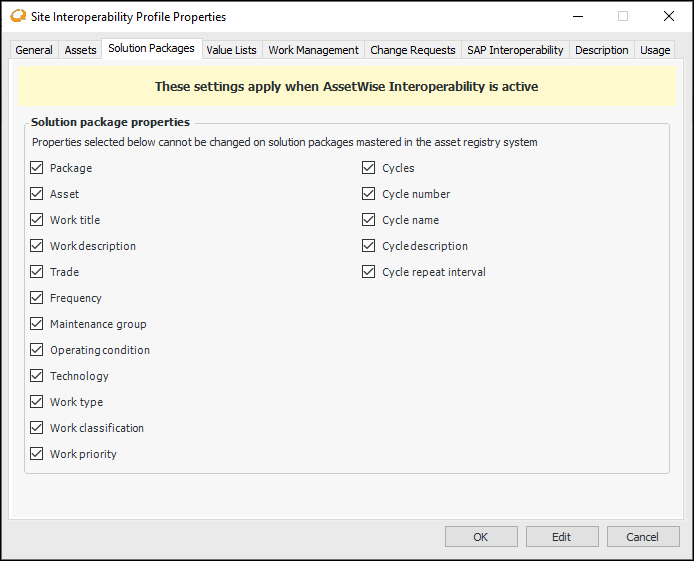
Solution Package properties (shown below) have not yet been implemented. These items should not normally be unchecked in a production system because AWEIS will not respect the setting when updating an existing object.