Reviewing Plan Costs and Information

APM provides several ways to view information about restorations from the Site window and the Asset Restoration Plan windows. This topic explains where to find information.

To View Site-Level Information about Restoration Plans

1.
In the Site window, select the Asset Health view and the Restoration Plans tab. The Plans tab provides several table configurations:
2.
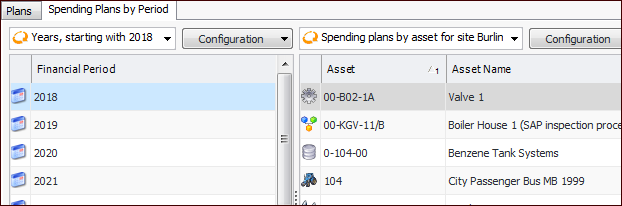
Select the Spending Plans by Period tab. This tab offers configurations for years, months, or quarters, starting with the current year. You can also view plans for all years, months, or quarters.
For example, select a year in the Financial Period column to see a list of the spending plans by asset for the current site:
The right-hand table also provides configurations for spending plans by asset for all sites and spending plans by site.

To View Information about a Restoration Plan
1.
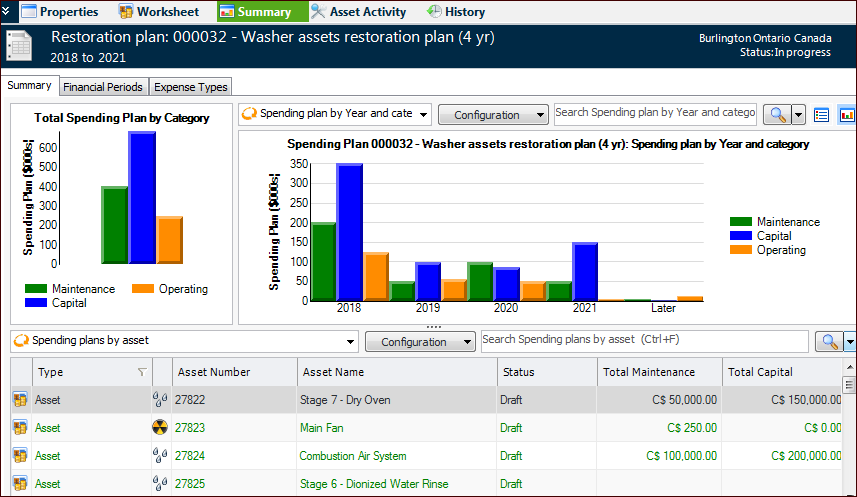
Open the Asset Restoration Plan window and select the Summary view. This view displays charts for total spending by category and by financial period and category. For example:
The table provides configurations for spending plans by asset, by year, and by year and asset. You can also view the total of spending plans by year.
2.
Select the Financial Periods tab to see each period’s spending plans or expense details.
3.
Select the Expense Types tab to view expense details by asset and type or by financial period and type.
4.
Select the History view to review audit information for the plan, its assets, spending plans, and expense details.