|
Printing Asset Prioritization Reports
Several types of analysis reports are provided with APM, which you can print from the Asset Analysis window or from the site’s Strategy Development view.
• Assets by Consequence Score – Lists each asset from highest to lowest consequence score
• Assets by Priority – Lists each asset from highest to lowest priority number
• Assets by Relative Risk – Lists each asset from highest to lowest relative riskThis topic describes how to print analysis reports. For information about saving a report to a file, see Printing Documents.To Print Analysis Reports
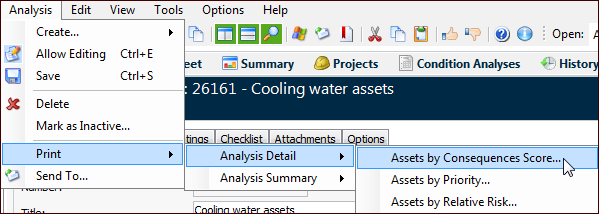
1. Tip: You can also print the report by right-clicking the analysis in any list, clicking Print, and then the report type. The reports at the top of the sub-menu are detailed. The reports in the bottom of the sub-menu are summaries.
2. In the Asset Analysis window, click the Analysis menu, Print, the report category, and then the report you’d like to print.
3.
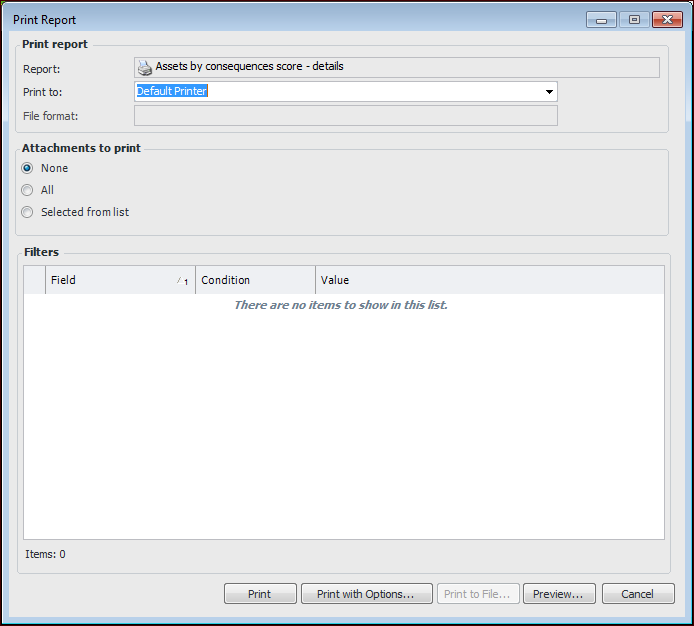
• Click All to print files attached to the analysis.
• Click Selected from list to choose the attachments to print. When you click Print or Print with Options, the Attachments to Print dialog appears, listing the file names, the objects they are attached to, and their attachment types.
5. If you are not printing attachments, you can click Preview to see what the report will look like before printing it.Tip: In the Preview dialog, click the File menu to print the report, export it to a file, or send it by email in one of several formats.
• Click Print. If you are printing selected attachments, the Attachments to Print dialog appears. Select the attachments and click OK.
• Click Print with Options to change printer options.