|
Setting up Report Statuses and Event Rules
To Create an Asset Health Report Status
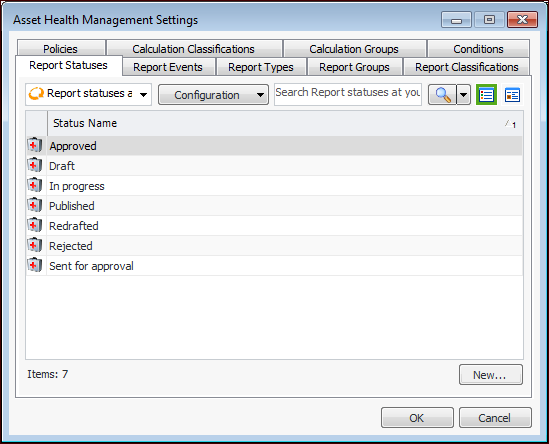
1. From the Site window, select the Administration menu, Asset Health Settings, and then Asset Health. The Asset Health Management Settings dialog appears.Tip: You can also select the Asset Health view, Settings tab, Asset Health tab, and then the Asset Health Settings node in the tree.
2. Select the Report Statuses tab. This tab displays a list of asset health report statuses for the enterprise.
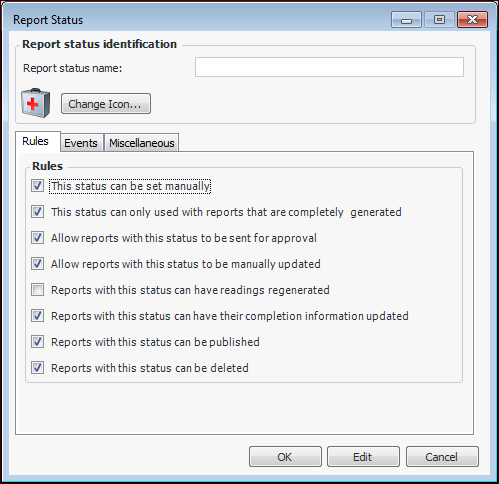
3. Click New. The Report Status dialog appears.
5. On the Rules tab, select the appropriate options:
6. On the Events tab, select the appropriate settings:
7. On the Miscellaneous tab, select the option if you want to include reports with this status in lists of open reports.
8. When you are finished, click OK to save and close the Report Status dialog.To Set Event Rules
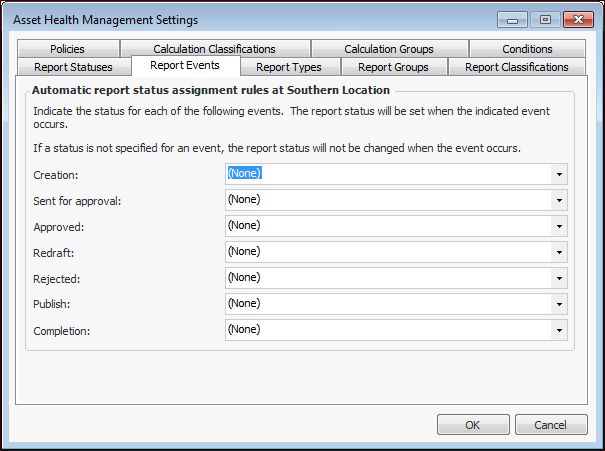
1. From the Site window, select the Administration menu, Asset Health Settings, and then Asset Health. The Asset Health Management Settings dialog appears.Tip: You can also select the Asset Health view, Settings tab, Asset Health tab, and then the Asset Health Settings node in the tree.
2. Select the Report Events tab. This tab displays a list of automatic report status assignment rules for the site.
4. Click OK to close the dialog.