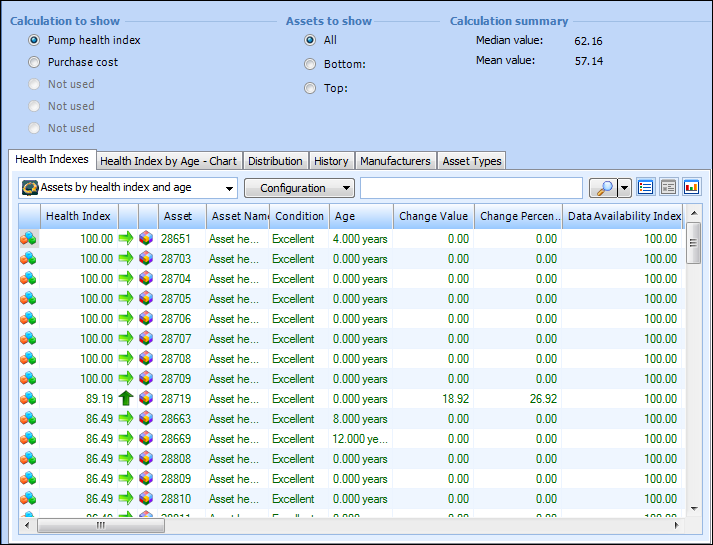
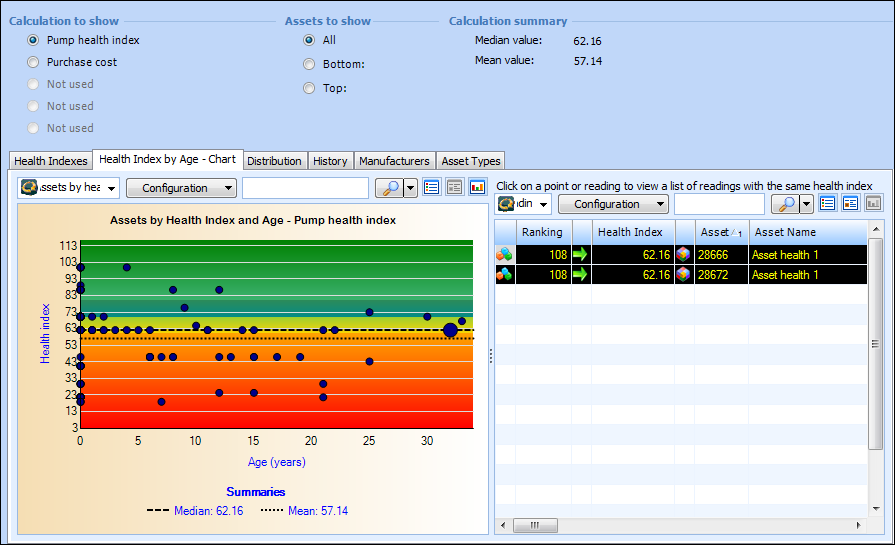
Concepts Tasks Settings What is Asset Health Monitoring? Asset health monitoring is a module available in APM Enterprise that allows you to define and execute calculations on current asset information to determine the viability of assets, as represented by an asset health index (AHI). The index is a numeric representation of the asset’s condition relative to other assets and its own history. Tracked over time, asset health indexes provide essential data for identifying assets’ maintenance and replacement timeframes. Asset health monitoring also contains features that allow you to easily execute those calculations for large groups of assets at the same time and display the results in the form of an online report. Preparing for asset health monitoring begins with deciding what to measure and how to measure it, which becomes the basis for the calculations and variables used in asset health report definitions. For example, you might want a report that extracts all assets greater than a certain age, or a report that identifies which assets have had service maintenance performed within the past year, and schedule the report to run on a regular basis. This topic explains reports, definitions, and calculation indexes and variables in the APM software that relate to asset health monitoring. You need to understand these concepts to implement and maintain asset health monitoring for your organization. Asset Health Reports Asset health reports display detailed and graphical information from the results of calculations defined in asset health report definitions. These reports can be generated manually or automatically based on a recurrence pattern. When an asset health report is generated, asset health readings are created for each of the assets included in the report. These readings can be viewed either via the asset health report itself, or directly on each asset. Each reading shows the overall value that was calculated for the asset in addition to the value that was derived for each of the inputs used in the calculation. These values are referred to as asset health indexes. Asset health indexes can be displayed in lists, allowing for detailed examination. For example, the following table lists assets sorted by asset health index values: Graphical views facilitate data analysis by providing a visual overview of summarized data. For example, the following chart depicts assets by health index and age for the pump health index calculation: Asset Health Report Definitions An asset health report definition lists the calculations to be executed and defines the frequency with which the report is generated, using a recurrence pattern. The report definition also identifies either the list of assets to analyze or criteria for selecting assets at run-time. Each asset health report can calculate up to five index values for each asset included in the report. Asset Health Calculations and Indexes Asset health calculations are used to derive an asset health reading. Each reading produces an asset health index for an asset. The index is a way of succinctly showing an asset’s health relative to its history and other assets. An asset health index is a numerical value assigned to an asset or group of assets that represents the overall asset health at the time of the reading. These indexes proactively assist in identifying assets that are in need of replacement or failing. An asset health index generally ranges between 0 and 100. For example, a pump might have an asset health index of 37 (poor) based on the fact that it has received five maintenance work orders in the past year, and is more than seven years old. Asset Health Calculations and Variables Asset health calculations are reusable calculations for the purposes of selecting assets for asset health reporting. These calculations can be simple or very complex. Asset health calculations are comprised of a VB, C#, or VB.NET script, or a stored procedure. If the expression is defined as a script, it can include one or more input variables that specify the data to extract from the system. Variables can be derived from a variety of sources: filter, another calculation, global variable, or a join path to an attribute or collection. In addition, you can apply limits, factors, and weighting to derived values.