Defining a Factor Table for an Asset Health Variable

Factor tables can be applied to an asset health variable’s derived value. A derived value is the raw value returned from an asset health calculation variable, for example, the age of pump assets.
Factor tables allow you to use a single number to represent a range of numeric values within an asset health calculation variable. For example, an asset’s age within the range of 0 to 5 years can be represented with a factor table value of 1. Subsequently, assets that are 6 to 10 years old can be represented by a factor table value of 2, 11 to 15 years a value of 3, and so on. In asset health calculations, each qualifying asset’s derived value is compared and then assigned a value based on the factor table.
A separate factor table can be defined for each asset health calculation variable.
You cannot assign both a factor table and limits to a variable at the same time.
For numeric variables that are applied to a factor table and weighted, the derived value is assigned a value based on the factor table and that resultant value is then multiplied by the weighting value. For more information, see Assigning Calculation Variable Limits and Weighting.
For more information about creating asset health calculation variables, see Creating Asset Health Calculation Variables.
This topic describes how to assign a factor table to an asset health calculation variable.

To Define a Factor Table for a Variable
1.
2.
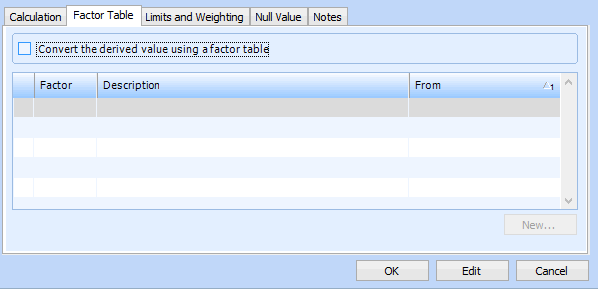
Select the Factor Table tab. For example:
3.
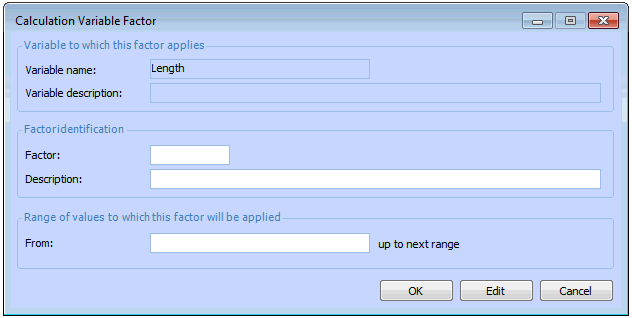
Select Convert the derived value using a factor table, and then click New. The Calculation Variable Factor dialog appears.
4.
In the Factor Identification area, enter an integer number to represent the factor value.
5.
6.
7.
Click OK to save and close the dialog and return to the Factor Table tab. The calculation variable factor appears in the table.
8.