|
Introduction to 4D Calculated Indicators
Formulas in Stored Procedures
Formulas in VB.NET and C# Scripts
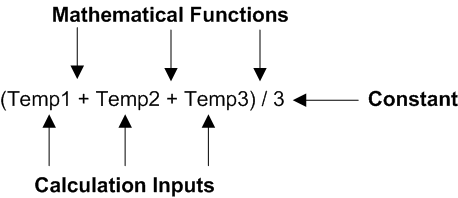
• Calculation inputs: data from another numeric 4D indicator; data from the current calculated indicator; or data derived from an APM object (for example, a count of work orders or the dates when indicator readings were entered)
• Mathematical functions: such as add, subtract, multiply, or divide
• Constants: a fixed value used in the calculationCalculation Inputs
• Based on indicator reading(s): data from an asset indicator
• Based on a filter: data derived from one or more APM objects (for example, the total number of work orders based on a selected work type)Indicator Reading-Based Inputs
Using the Current (Calculated) Indicator as an Input
Aggregating Indicator-Based Inputs
Filter-Based Calculation Inputs
Count-Type Inputs
Percentage = (Number of completed work orders where the planned completion date was in the last month) ÷ (Total number of work orders where the planned completion date was in the last month) x 100Aggregating Filter-Based Inputs
The same result could also be achieved using a more complex formula with a different aggregate type:Using Numeric and Non-Numeric Data Types as Inputs
•
•
For more information on relationships and attributes, see Relationship Types and Data Types. To learn more about the APM object model, see Object Model Overview.Aggregation Types
Array Aggregation
First Aggregation Type
Last Aggregation Type
How Calculation Inputs are Used in VB.NET and C# Scripts
Units of Measure
Integers and Averages
Units of Measure
Functions in VB.NET and C# Scripts
VB.NET
C#
Calculation Inputs and Argument Names
Function Examples
Using a String in a Calculation
VB.NET
C#
Using an Enumerated Attribute in a Calculation
•
•VB.NET
C#
Using a Boolean Attribute in a Calculation
VB.NET
C#
Using an Array in a Calculation
VB.NET
C#
Number of Values in an Array
VB.NET
C#
Using a Date Attribute in a Calculation
VB.NET
C#
Required Proximity
What Happens When a Calculation Fails?
Calculation Failures
• Divide by zero: This situation occurs when the calculation contains an input that is used in the calculation as a divisor and the current value of the input is equal to zero.
• Null input: This situation occurs when one of the inputs in the calculation evaluates to null (no value). This can happen for several reasons, for example:
• Calculation string error: This situation occurs when the calculation string itself is flawed. This can happen, for instance, when the calculation expression contains Boolean logic that does not properly deal with every value that an input can have.
• Indicator’s asset is non-operational: If the asset that owns the calculated indicator is in a non-operational state, the indicator is not recalculated if a new reading is entered for one of its inputs and that input’s indicator belongs to a different asset. However, if the input’s indicator belongs to the same asset, the indicator is recalculated.
• Inputs are outside the required proximity: This setting is only applicable when a calculation uses more than one indicator reading-based calculation input. This rule does not apply to filter-based calculation inputs. With required proximity, you can specify the length of time within which all readings must have been collected in order for APM to evaluate the rule or calculation. If any of the indicators fall outside of the required time period, APM does not evaluate the calculation.